


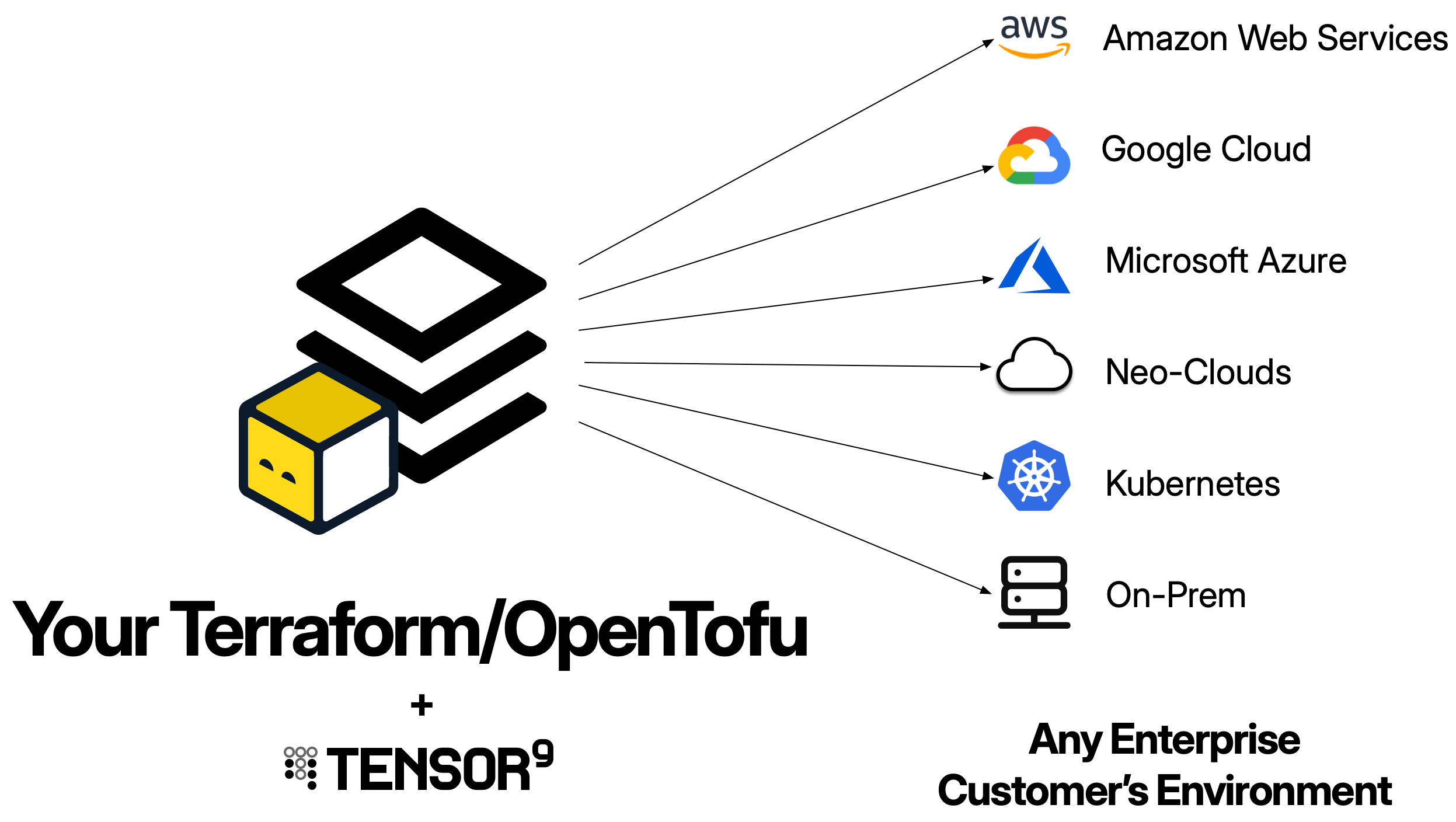
What is a Terraform origin stack?
A Terraform origin stack is your existing Terraform configuration - the.tf files that define your application’s infrastructure. Tensor9 uses this as the blueprint to generate deployment stacks tailored to each customer’s environment.
When you publish a Terraform origin stack to Tensor9, your control plane:
- Archives your Terraform workspace into a
.tf.tgzfile - Uploads it to your control plane’s S3 bucket
- Uses it as the template for generating deployment stacks for each appliance
Your origin stack should be your existing Terraform configuration. Tensor9 is designed to work with the infrastructure-as-code you already have - you don’t need to write a new stack just for Tensor9. The goal is to maintain a single stack that works for both your SaaS deployment and private customer deployments.
How Terraform origin stacks work
Using Terraform with Tensor9 follows a straightforward workflow:1
Publish your origin stack
You publish your Terraform workspace to your control plane using
tensor9 stack publish. This uploads your .tf files as a compressed archive to your control plane’s S3 bucket.2
Create a release
When you want to deploy to an appliance, you create a release using
tensor9 stack release create. During release creation, your control plane compiles your origin stack into a deployment stack tailored to that specific appliance.The compilation process:- Translates cloud-specific resources to match the appliance’s target environment (e.g., AWS RDS → Google Cloud SQL)
- Injects the
instance_idvariable to ensure resource uniqueness - Instruments the stack for observability (logs, metrics, traces)
- Rewrites artifact references to point to appliance-local locations
3
Deploy the deployment stack
Your control plane downloads the compiled deployment stack into a directory named after your appliance. This deployment stack is itself a complete Terraform workspace.You deploy it using standard Terraform commands:For a test appliance:For a customer appliance:This creates all the infrastructure resources in the appliance environment.
tofu apply.
Prerequisites
Before using Terraform as an origin stack, ensure you have:- Terraform or OpenTofu installed: Version 1.0+ recommended
- Valid Terraform configuration: Your configuration must pass
tofu validate - Tensor9 CLI installed: For publishing your origin stack to your control plane
- Tensor9 API key configured: Set as
T9_API_KEYenvironment variable
This guide uses the
tofu CLI in all examples. If you’re using Terraform instead of OpenTofu, simply replace tofu with terraform in all commands - they work identically.Structure of a Terraform origin stack
Your Terraform origin stack should follow standard Terraform conventions:Publishing your Terraform origin stack
To make your Terraform configuration available to Tensor9, publish it to your control plane:What gets published
Thetensor9 stack publish command:
- Creates a
.tf.tgzarchive of all.tffiles in the specified directory - Uploads the archive to your control plane’s S3 bucket
- Returns a native stack ID you’ll use to bind the stack to your app
Publishing updates
When you make changes to your Terraform configuration, publish a new version:Binding your origin stack to an app
After publishing for the first time, bind your origin stack to your app:Parameterization
Parameterization is the process of making your origin stack capable of being deployed to multiple appliances without resource naming conflicts. This is the most critical requirement for a Terraform origin stack in Tensor9.The instance_id variable
Tensor9 automatically injects aninstance_id variable into every deployment to ensure resource uniqueness across appliances. Your origin stack must declare this variable:
Using instance_id for resource naming
Useinstance_id to make all resource names unique. This prevents conflicts when deploying to multiple customer appliances:
What to parameterize
Useinstance_id for:
- Resource identifiers: S3 bucket names, RDS identifiers, Lambda function names
- IAM resources: Role names, policy names
- Networking: VPC names, subnet tags, security group names
- Logging: CloudWatch log group names
- Secret paths: Secret Manager secret names
DNS names are managed automatically: Tensor9 automatically generates DNS names for your appliances using either your vendor vanity domain or the customer’s vanity domain (if they specified one). You don’t need to include
instance_id in DNS records. See Endpoints and DNS for details.Complete example origin stack
Here’s a complete Terraform origin stack for a typical SaaS application:main.tf
variables.tf
outputs.tf
versions.tf
Tagging resources
Tag all resources withinstance-id to enable observability and permissions scoping:
- Steady-state permissions to filter telemetry by appliance
- Cost tracking for customers to monitor spending per appliance
- Resource discovery by Tensor9 controllers
Backend configuration
Tensor9 does not modify backend configuration in your origin stack. You have full control over Terraform state management.Option 1: Include backend in origin stack
Backend blocks don’t support variable interpolation: Terraform backend configuration cannot use
${var.instance_id} or other variable references. If you include a backend in your origin stack, use a fixed key path. Tensor9 recommends using Option 2 or 3 below to provide instance-specific state paths at deployment time.Option 2: Provide backend at deployment time
Don’t includebackend.tf in your origin stack. Instead, provide backend configuration when deploying:
For a test appliance:
Option 3: Add backend after compilation
Createbackend.tf in the compiled deployment stack directory before running tofu init:
For a test appliance:
Using modules
Terraform modules work seamlessly with Tensor9. You can use both local and remote modules:Local modules
.tf.tgz archive when you publish.
Remote modules
tofu init when deploying.
Important: Always pass instance_id to modules to ensure resources they create are unique per appliance.
Outputs
Define outputs to expose important values after deployment:tofu output:
tensor9 report:
Service equivalents
When you create a release for an appliance, Tensor9 compiles your origin stack by replacing AWS-specific resources with their equivalents in the target environment. Example: AWS to Google Cloud Origin stack (AWS):Best practices
Always use instance_id for resource naming
Always use instance_id for resource naming
Every resource that has a name, identifier, or globally unique value should include Without
instance_id:instance_id, deploying to multiple appliances will fail due to resource naming conflicts.Tag all resources
Tag all resources
Tag every resource with This enables:
instance-id:- Observability permissions scoping
- Cost tracking per appliance
- Resource discovery
Use outputs for important values
Use outputs for important values
Define outputs for values that operators or other systems need to access:These appear in
tensor9 report and tofu output.Validate before publishing
Validate before publishing
Always validate your Terraform configuration before publishing:This catches syntax errors and missing variables early.
Test in test appliances first
Test in test appliances first
Never deploy directly to customer appliances without testing:
- Publish your origin stack
- Create a release for a test appliance
- Deploy and validate
- Then create releases for customer appliances
Use version constraints for providers
Use version constraints for providers
Pin provider versions to avoid unexpected changes:This ensures consistent behavior across deployments.
Organize with modules
Organize with modules
For large applications, use modules to organize resources:This improves maintainability and reusability.
Troubleshooting
Publishing fails with 'invalid Terraform configuration'
Publishing fails with 'invalid Terraform configuration'
Symptom:
tensor9 stack publish fails with validation errors.Solutions:- Run
tofu validatelocally to identify syntax errors - Ensure all required variables are declared
- Check that all referenced resources exist
- Verify provider versions are compatible
Compilation fails with 'unsupported resource type'
Compilation fails with 'unsupported resource type'
Symptom: Release creation fails because a resource type isn’t in the service equivalents registry.Solutions:
- Check if the resource is supported in your target form factor
- Use a more generic resource type if available
- Contact Tensor9 support to request support for the resource type
Deployment fails with resource naming conflicts
Deployment fails with resource naming conflicts
Symptom:
tofu apply fails with “resource already exists” errors.Solutions:- Ensure all resource names include
${var.instance_id} - Check that you’re not hard-coding any globally unique identifiers
- Verify the
instance_idvariable is declared invariables.tf
State management issues
State management issues
Symptom:
tofu init fails with backend errors or state is not found.Solutions:- Verify backend configuration is correct
- Ensure state bucket exists and is accessible
- Check that backend configuration includes
${var.instance_id}for unique state paths - See Backend Configuration
Next steps
Now that you understand Terraform origin stacks, explore these topics:- Quick Start: Terraform: Step-by-step guide to your first deployment
- Deployments: How to create releases and deploy
- Service Equivalents: How Terraform resources are mapped across clouds
- Testing: Validate your origin stack in test appliances