Break-Glass Into a Customer’s Environment, on Their Terms

Most of the time, operating software that runs in your customer’s environment doesn’t need a shell. You submit a scoped command (run a scoped query, tail a log, restart a service), your customer approves that one command, it runs, and the authorization ends with it. We wrote about that path in Operating Software You Can’t Log Into: the everyday tier, where the unit of trust is a single command and nothing stands open between incidents.
But some incidents don’t fit a command. A latency alarm fires on your service, and the trail leads to the database: a production Postgres inside your customer’s VPC. Connections are climbing toward the limit and queries are backing up behind something, but the dashboards don’t say what. It isn’t a slow query you already know about, and you don’t yet know what you’re looking for, so no pre-built command covers it. What you actually need is an interactive psql session: read pg_stat_activity, find the transaction holding a lock, look at the query plan for yourself. But the database is private inside your customer’s VPC, and you hold no credentials and no route to it.
The familiar way to get in is standing access, a bastion or a just-in-time role or a database credential handed over for a few hours, and it’s exactly what the customer’s security team is right to resist. Standing access is a broad grant that sits there whether or not anyone is using it, and if it’s how you routinely get in, it’s a path into their environment they have to account for in their own next audit.
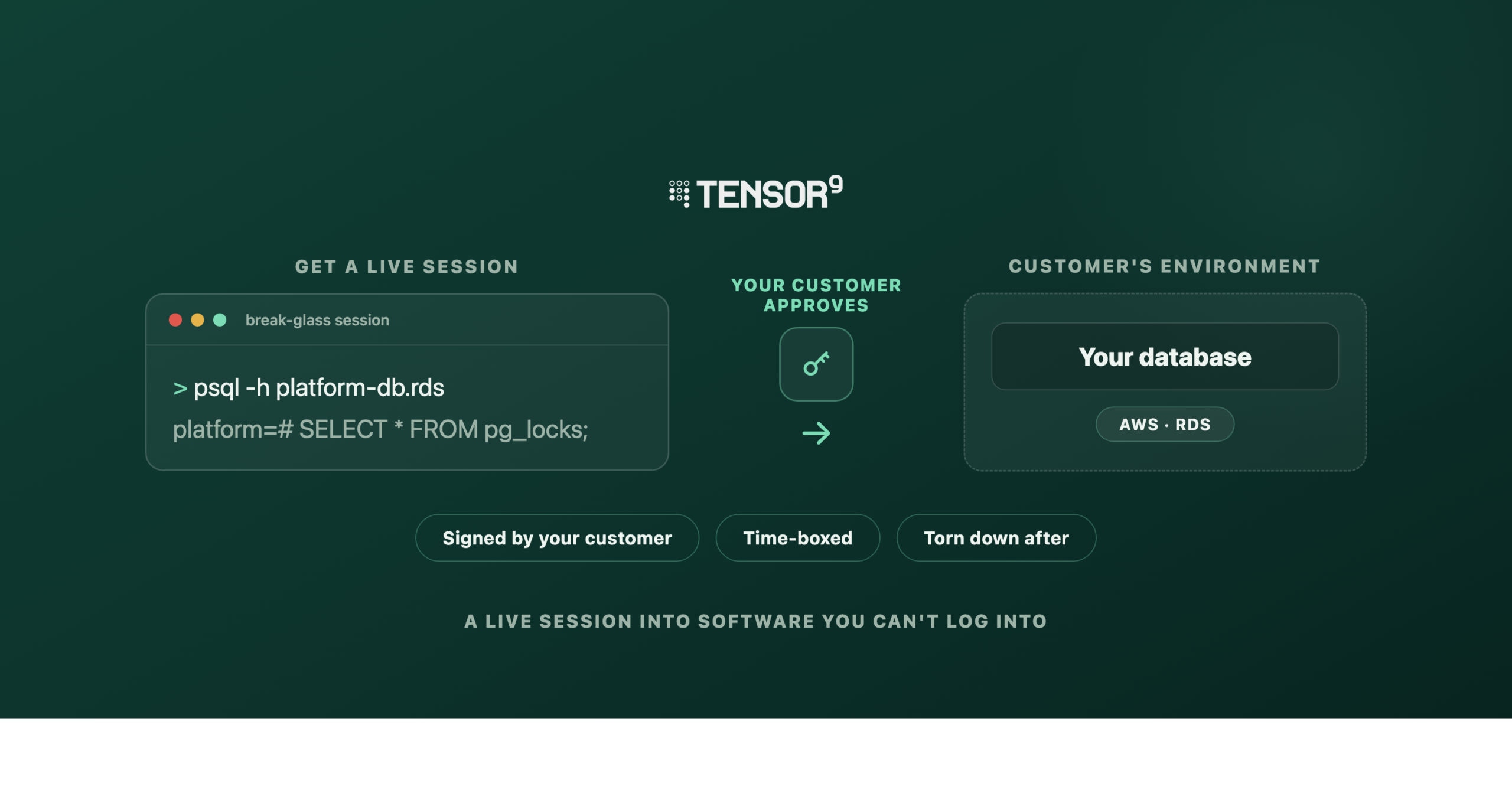
Break-glass is the tier for that case: a shell for the rare time you need one, without the standing access. It’s one-time, time-bounded access to a single named resource: you request it, your customer reviews and cryptographically approves that one request, the access opens for a bounded window, and when the session ends everything is torn down. Each session is assembled from two independent parts, a network path to the resource and a credential to authenticate with, both scoped to that session alone.

This post covers what a break-glass session is, how you bring your own tunnel provider (Tailscale or Twingate), and why the connector runs inside the customer’s own network, with three short videos of the flow.
The same approval, a bigger ask
To your customer, break-glass isn’t a new thing to learn. It arrives as the same Support Access Request they already approve for operational commands: the same wizard, the same Reject-or-Continue decision, signed with the same key only they hold. Only the body differs: “we need a scoped psql session on the payments database for the next two hours” instead of “we need to run this command.” The unit of trust is a session rather than a command. A shell can do more than a named command, so it’s approved and audited per session, and stays rare.
Video 1: The vendor requests break-glass access to one resource, a production Postgres, with a reason and a time limit. The customer opens the request, sees exactly which resource, for how long, and why, and approves it, signed with a key only they hold.
Nothing is granted by the request itself. It waits on your customer. Once they approve, the system assembles the network path and the credential, the session goes live for the approved window, and when the window closes it ends. A session that can’t be assembled safely never comes up at all. Every step lands in an audit record in the customer’s own environment: who asked, who approved, when access started, and when it ended, kept under the customer’s own retention where their auditors and SIEM already look.
Bring your own tunnel
A break-glass session runs over a provider your customer already trusts, and today that’s Tailscale or Twingate, two networks a security team is likely to already run, or to approve far faster than a bastion you rolled yourself.
From the operator’s side the two look the same: request access, wait for approval, connect to the resource. Underneath, they’re different kinds of network, and break-glass uses each one the way it’s built to work rather than forcing them into a common shape.
Video 2: The customer applies the connector bundle with their own credentials. A Twingate connector dials outbound and the session goes live. The operator reaches the database over the tunnel, scoped to that one resource, for the approved window.
With Twingate, a connector container boots inside the customer’s network and dials out to Twingate’s cloud; the vendor reaches it through the relay, scoped to that one resource. With Tailscale, a subnet router joins the customer’s own tailnet, and access is a single ACL grant pinned to one address and port, scoped by a per-session tag pair that’s created for the session and removed at the end. Different mechanics, same guarantees: the reach is one resource on one port, pinned at approval, and the credentials are one-use, so re-applying a stale bundle after the session ends won’t get you back in.
The connection only ever runs one way, and that is the part a security review comes down to. In both cases the connector dials outbound to the tunnel’s control plane. Nothing inbound is opened in the customer’s firewall, and the vendor never holds a key that reaches into the customer’s environment on its own.
Both providers reach their control plane over an outbound internet connection, so break-glass assumes the customer’s environment has that egress; fully air-gapped enclaves aren’t in scope for this path.
Why the connector runs in the customer’s network
There’s a deliberate split in how a session is authorized.
When your customer approves, we provision the tunnel’s identity on the provider’s control plane (the connector registration, the one-use tokens or keys, the access grant). But that identity is inert. It can’t carry a single byte until a connector is actually running inside your customer’s network, and standing up that connector requires your customer’s own cloud credentials, which we don’t have. So the last mile is a small Terraform package you hand your customer to download and apply in their environment. Their terraform apply, run with their credentials, is what turns the inert identity into a live tunnel.
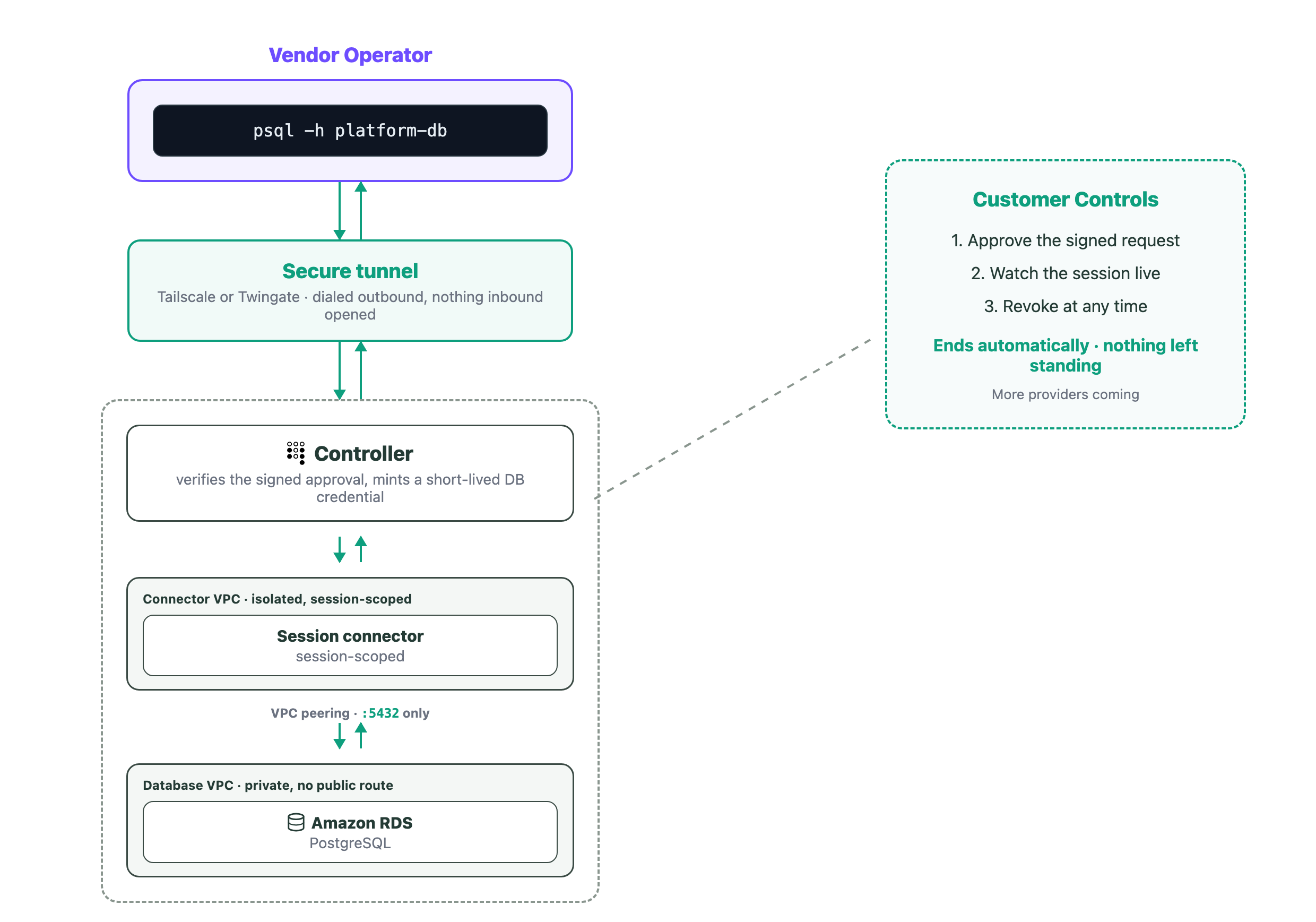
A break-glass session for a database incident: the operator runs psql through the tunnel to a session-scoped connector inside the customer’s network, which reaches the private Postgres instance and nothing else. A controller in the customer’s account verifies the signed approval before anything runs. The database login is brokered from the customer’s own secrets store by a customer-approved recipe, never held by Tensor9. The customer approves, watches, and can revoke at any time.
For this incident, that Terraform stands up a session-scoped connector inside the customer’s network, with no reach anywhere except the one Postgres instance on its one port. The database login is a separate matter. Unlike a Kubernetes cluster, Tensor9 can’t mint a database credential natively, and it doesn’t need to: the login already lives in the customer’s own environment. A vendor-authored, customer-approved recipe fetches it from their secrets store (or generates one) for the session, so Tensor9 brokers the connection but never holds the credential. Your psql reaches the database through the tunnel and authenticates with that login. At no point does the vendor keep a standing credential or any access that outlives the window.
What the operator can reach is capped by the tunnel: the one Postgres instance the approval named, on its one port, and nothing else, so there’s no pivot to another host. Inside the database, the operator authenticates as the login the recipe brokered, so the privileges are the ones the customer’s own role carries. The approval pins which resource and for how long, and the whole session is recorded in the customer’s own environment: the request, the signed approval, and when it went live and ended. Query-by-query capture inside the session isn’t part of break-glass today.
That division is deliberate: the approval authorizes provisioning, and your customer’s own apply authorizes traffic. We can’t skip it, because we can’t run it: only your customer can boot a container in their own network.
The approval itself is signed, and it’s bound to the exact request: the resource, the privilege level, the duration, the tunnel provider. Change any of those after the fact and verification fails. The customer holds an Ed25519 keypair whose private half never leaves their environment and whose public half is pinned inside their own account, where our control plane can’t touch it. A controller running in the customer’s account re-verifies the signature against that pinned key before it mints anything, so our control plane coordinates the workflow but is never trusted to grant access. The result: even a fully compromised Tensor9 control plane cannot mint access, widen its privilege, point it at a different resource, or extend its duration. The customer-signed approval is the durable, non-repudiable record of what they consented to.
Nothing left behind
Video 3: When the session ends, the Twingate connector is torn down and the resource deprovisioned. Cleanup completes with no persistent accounts and nothing left standing. The customer can also end it early at any time.
The requested duration is the window of usable access. The clock starts when the session goes live, after your customer approves. When it elapses the session tears itself down: the connector is removed and the tunnel is gone, so the path to the database closes, and any login the recipe generated for the session is revoked. The customer keeps a kill switch the whole time and can end it early without waiting for the clock. And if a session gets stuck partway up, a timeout sweeps it.
Nothing that could carry traffic outlives the session. On Tailscale the teardown is complete. On Twingate one inert piece of shared setup, the per-install network grouping the connectors attach to, is kept across sessions and reconciled out of band when the install itself goes away, and on its own it routes nothing. Between sessions, nothing privileged that break-glass created remains in your customer’s account: no live connector, no valid credential, no open path.
Where it fits
Both providers carry real tunnel traffic through the full lifecycle (request, approve, connect, expire) over Tailscale and over Twingate, each session authorized by a short-lived, revocable, signed approval and nothing longer-lived.
Reaching for break-glass should be the exception. What’s worked for us is to make the everyday work of operating software in your customer’s environment a scoped, approved, audited command with no standing access, and to keep break-glass as the rare, higher-friction path for the incident that genuinely needs a shell. Kept that rare, it’s an easy trade to defend in a review: a per-session tunnel over a network your customer already trusts, torn down when the window closes, beats a standing bastion and a key someone has to remember to rotate.
If the incident you’re dreading is the one that pages someone into a customer environment you have no way into, reach out and we’ll walk through how a break-glass session would play out against a deployment shaped like yours, on the tunnel provider your customers already run, with them holding the approvals.