Form Factors: How Software Vendors Define Where Their Software Can Run

Share this:
Two customers both want to run your software on AWS. Customer A has full internet connectivity, IAM roles for everything, and managed services everywhere. Customer B has strict network policies, no outbound internet from their VPC, and runs their own PostgreSQL on EC2 instead of RDS. Both are “AWS.” The infrastructure they need is completely different.
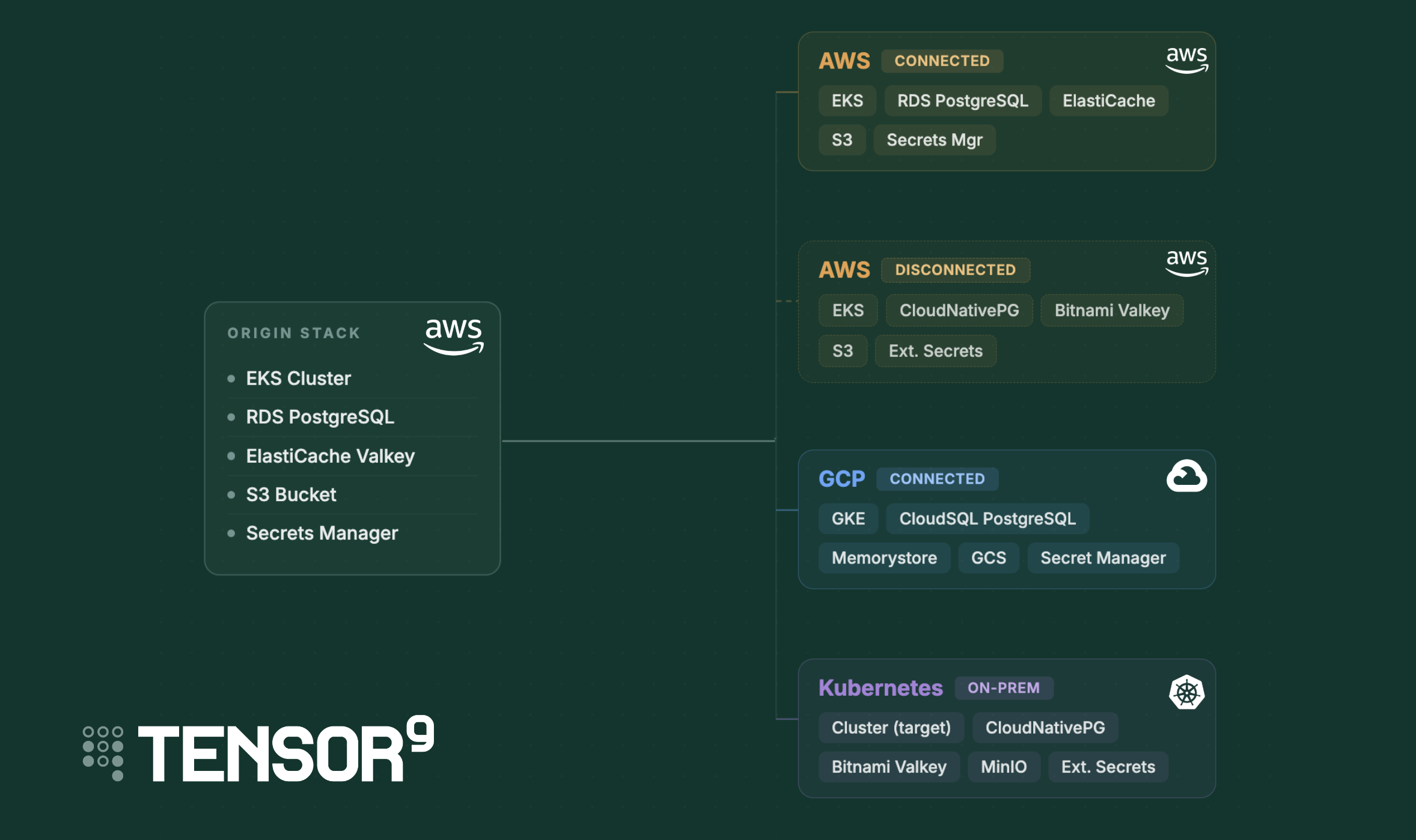
A deployment target is not a cloud provider. It’s a cloud provider plus a connectivity mode plus security requirements plus the specific services available in that environment. These dimensions vary independently. AWS with managed services and AWS with self-hosted services can be as different from each other as AWS and on-prem Kubernetes.
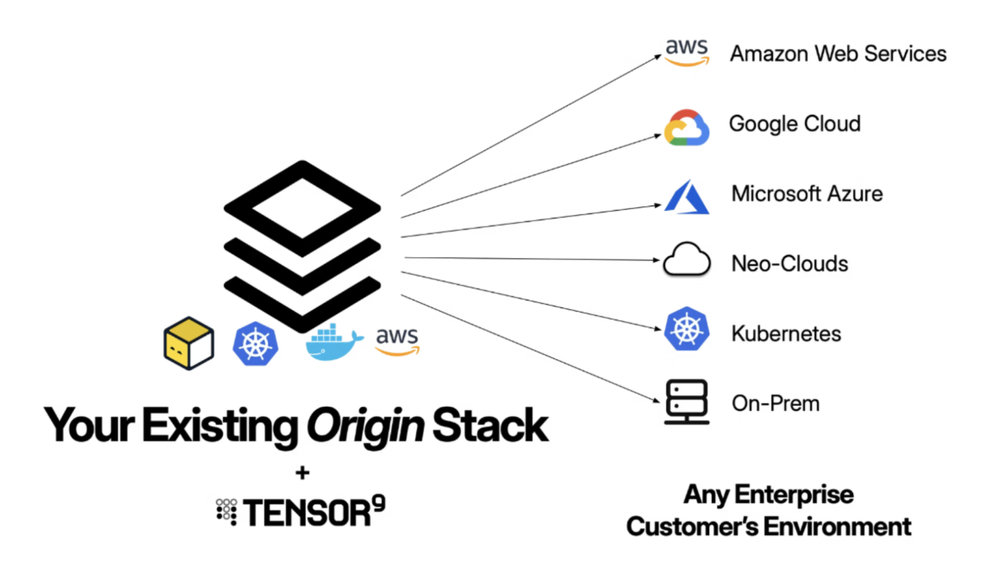
Serving every environment without multiplying codebases
The straightforward approach is to maintain a separate infrastructure codebase per target: one for AWS with managed services, one for AWS without, one for GCP, one for Kubernetes. This might work if you have two targets, say, AWS with managed services and AWS without managed services. But at five targets, this becomes unmanageable: every feature you add to your SaaS stack has to be replicated across each codebase; every version bump, every new dependency, every security patch is multiplied by the number of environments you support; the codebases drift, and you may only discover the drift when a customer deployment fails.
The alternative we wanted was a single origin stack. You use your existing infrastructure code, targeting the cloud you know. Then you describe each target environment declaratively, and a compiler produces the right infrastructure for that target. The origin stack stays the same whether you’re deploying to a customer’s AWS account with RDS or to an on-prem Kubernetes cluster running CloudNativePG.
That’s the role the notion of a form factor fills.
What form factors model
A form factor is a structured declaration that captures all of these dimensions together: environment, connectivity, security posture, required services with version constraints, and supporting dependencies. Vendors define them. The system uses them to validate environments before deployment, translate infrastructure across clouds, and enforce compatibility automatically.
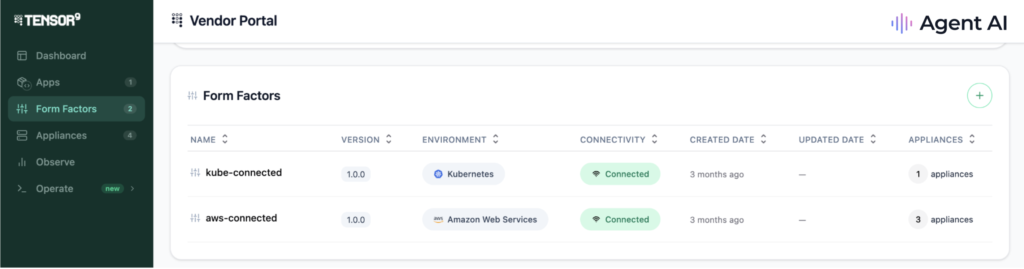
For you, the payoff is precise control over your support surface. You publish form factors for the environments you actually want to support. Customers on an environment you haven’t published a form factor for don’t see a deployment option. When you’re ready to expand, you add a new form factor declaration rather than a new codebase.
For customers, form factors work invisibly. They never see the term. What they see is a set of deployment options you’ve made available and a guided flow that validates their environment against your requirements before anything gets deployed. If something is missing or incompatible, the system tells them specifically what needs to change. No 40-page deployment guide, no back-and-forth with your support team to figure out whether their setup is compatible.
Form factors also give customers meaningful choices within the boundaries you set. A vendor who needs PostgreSQL can define a service requirement that accepts either RDS or CloudNativePG. The customer picks the one that fits their environment and operational preferences. They get flexibility where it matters to them; you get a guarantee that either choice satisfies your application’s requirements. You draw the boundary, the customer chooses within it.
This post walks through how that works in practice, how form factors connect to the service equivalents registry for cross-cloud compilation, where they hand off to fine tuning, and how the pieces fit together in the full Tensor9 workflow.
How form factors work in practice
You declare requirements, customers satisfy them
As a vendor, you define form factors for each deployment option you want to support. Here’s what an AWS connected form factor looks like:
name: aws-connected
description: AWS deployment with managed PostgreSQL
environment: aws
connectivity: connected
service_requirements:
  - service: aws::1.0.0::eks::cluster
    versions: ">=1.27.0"
  - service: aws::1.0.0::rds::postgresql
    versions: ">=14.0.0 <17.0.0"
security_requirements: []
This says: “To run our application in an AWS connected mode, you need an EKS cluster running at least Kubernetes 1.27 and an RDS PostgreSQL instance between version 14 and 16.”
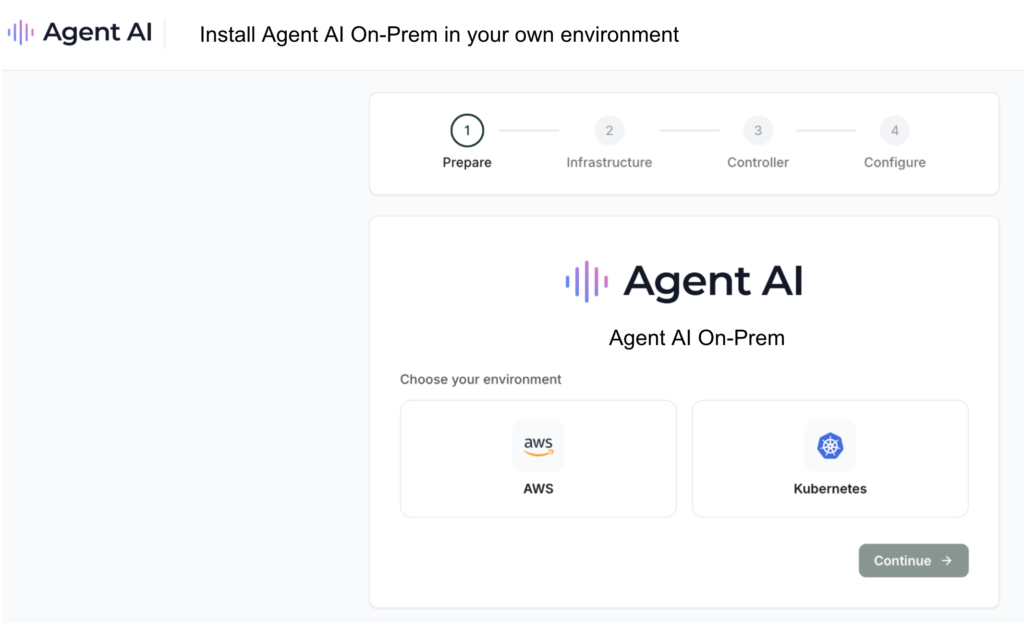
On the customer side, they don’t interact with form factors directly. When a customer sets up their environment (what Tensor9 calls an “appliance”), the system walks them through satisfying the form factor’s requirements. For some services, the customer brings what they already have: “I have a GKE 1.28 cluster and CloudSQL PostgreSQL 15.” For others, they can choose to have you (via Tensor9) deploy the service into their environment: “Deploy CloudNativePG for me.” The appliance profile captures both what the customer brought and what was provisioned on their behalf, and the system matches that against your form factor requirements.
If the customer’s environment satisfies your requirements, deployment proceeds. If not, the system tells them exactly what’s missing — not a vague “unsupported environment” error, but “you need PostgreSQL >= 14.0.0 and your cluster is running 13.2.”
The service equivalents registry
Form factors declare what services you need. But your Terraform code was probably written against a specific cloud, for example, AWS. When a customer runs on GCP, something has to bridge that gap. That’s what the service equivalents registry does.
The registry maintains a mapping of functionally equivalent services across clouds. For example:
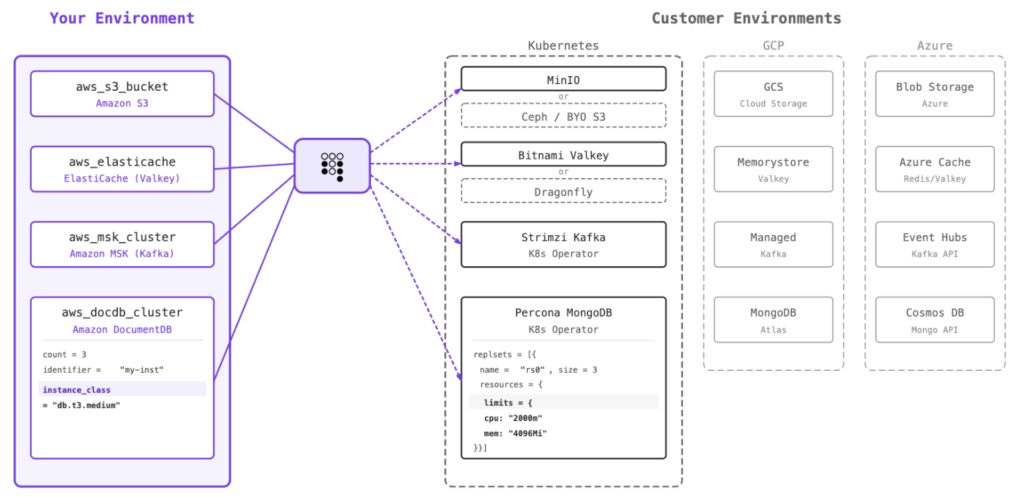
When the compiler processes your Terraform, it uses the registry to substitute services. Your aws_eks_cluster resource becomes a google_container_cluster resource. Your aws_db_instance becomes a google_sql_database_instance. The compiler handles the translation, including the structural differences in how each cloud provider represents these resources.
This is where the “equivalent functionality, not identical runtime” distinction matters. GKE is not EKS. CloudSQL is not RDS. But they serve the same purpose in your application’s architecture: a managed Kubernetes cluster, a managed PostgreSQL database. The service equivalents registry encodes these equivalences so the compiler can act on them.
For services without a direct managed equivalent in the target cloud, the registry maps to cloud-native alternatives. If a customer doesn’t have a managed Kafka service, the compiler can substitute Strimzi (a Kubernetes-native Kafka operator). If there’s no managed object storage, MinIO or Ceph fills that role. The form factor can also express this flexibility directly using choice-based requirements:
service_requirements:
  - one_of:
    - service: aws::1.0.0::rds::postgresql
      versions: ">=14.0"
    - service: cloudnative::1.0.0::postgresql
      versions: ">=14.0"
This tells the system: “We need PostgreSQL. We prefer AWS RDS, but CloudNativePG is also fine.” The customer’s environment determines which option gets used.
Where form factors end and fine tuning begins
Form factors answer the question “what does this application need to run?” They don’t answer “how should it be configured for this specific deployment?”
That’s where fine tuning takes over. A fine tuning document handles deployment-specific configuration, e.g:
- Replica counts: How many instances of each service to run
- Resource limits: CPU and memory allocation per service
- Storage sizes: Volume sizing for persistent data
- Service-specific configuration: Tuning parameters per service
The handoff is clean. Form factors define the structural requirements (the environment, the services, the versions, the compliance posture) and fine tuning defines the operational parameters (the sizing, the secrets, the endpoints).
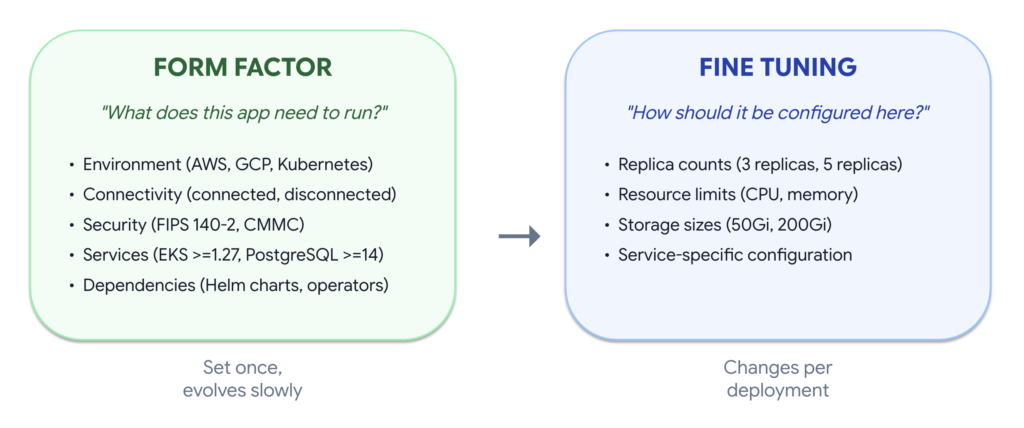
In practice, form factors are set once and evolve slowly (when you add a new service dependency or bump a version requirement). Fine tuning changes per deployment; a large enterprise customer gets different replica counts and resource limits than a smaller one running a proof of concept. A large enterprise customer might need a 200GB PostgreSQL instance with 8 vCPUs, but a smaller customer running a pilot needs a 20GB instance with 2 vCPUs. The form factor is identical (they both need PostgreSQL >=14). The fine tuning is what differs.
The full flow
Here’s how form factors fit into the overall Tensor9 workflow, from vendor onboarding through customer deployment:
1. You write infrastructure code. You use your existing Terraform definition, targeting your primary cloud. You don’t need to write multi-cloud code; you write for the cloud you know.
2. You define form factors. You declare which environments you support and what each one requires. Start with one. Add more as customer demand requires.
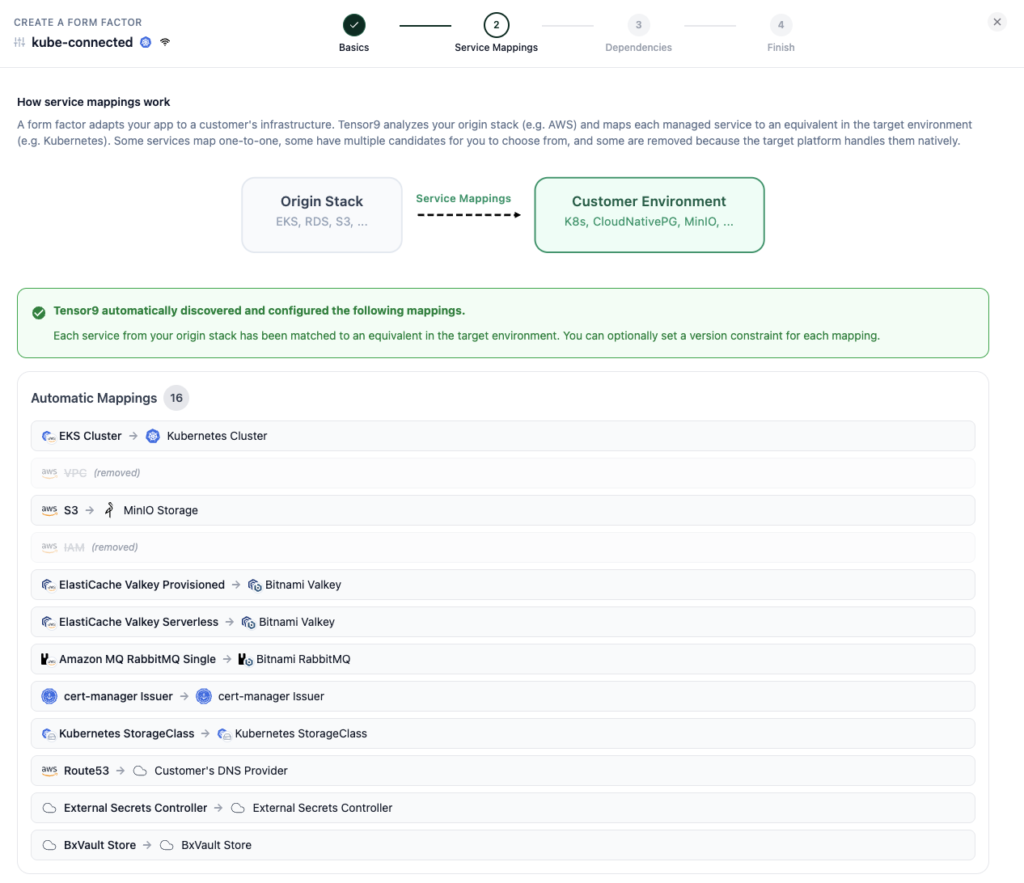
3. You validate against test appliances. Before any customer sees a form factor, you spin up test appliances that mirror your target environments and verify that your stack compiles and deploys cleanly against each one. Form factors give you a standard, repeatable contract to test against, so you catch incompatibilities in your CI pipeline rather than in a customer’s environment.
4. Customer sets up their appliance. Your customer picks from the deployment options you’ve published and walks through a guided setup. For each service requirement, they either bring an existing service (“I already have CloudSQL”) or choose to have it deployed into their environment (“Deploy CloudNativePG for me”), based on what you’ve made available to them.
5. Compiler translates infrastructure. Using the service equivalents registry, the compiler maps your origin infrastructure to the customer’s target environment. AWS EKS becomes GCP GKE. RDS PostgreSQL becomes CloudSQL.
6. You apply fine tuning. Deployment-specific parameters such as replicas, resource limits, and secrets are layered on via a fine tuning document.
7. You deploy. The compiled, tuned infrastructure is deployed into the customer’s environment. The customer doesn’t run Terraform or manage the deployment pipeline; Tensor9 handles the release lifecycle.
Steps 1 through 3 happen once (with occasional updates as your stack evolves). Steps 4 through 7 happen per customer. The form factor is the contract between those two phases; it captures what you’ve committed to supporting and what the system enforces at deployment time.
If you’re building on-prem for the first time
You don’t start by standing up a parallel codebase. You define your origin stack (which you already have; it’s your SaaS infrastructure), declare the target environment as a form factor, and let the compiler produce the infrastructure. Start with one form factor for the environment your most urgent customer is asking for. Don’t try to boil the ocean with five targets on day one.
When the second customer asks for a different environment, you add a second form factor. Not a second codebase. The compiler and service equivalents registry handle the cross-cloud translation. Adding a GCP form factor doesn’t mean rewriting your Terraform; it means declaring a new set of requirements and letting the system map your existing infrastructure code to GCP services.
You can also offer customers flexibility from day one without building multiple codepaths. If you need PostgreSQL but don’t care whether the customer uses CloudSQL or runs CloudNativePG themselves, define that as a choice in the form factor. The customer picks, and the compiler compiles for that choice. The constraint: all options must actually be interchangeable for your application. If you depend on CloudSQL-specific features, that’s a fixed requirement, not a choice.
If you’re already doing self-hosted
You’ve already paid the complexity tax. You have deployment scripts, compatibility matrices, maybe a custom installer. Form factors give you a way to formalize what you’ve learned. Instead of keeping your GCP Terraform in sync with your AWS Terraform, you maintain one origin stack and let the compiler produce the output for each target.
The immediate value: when you add ElastiCache to your SaaS stack, you don’t have to remember to add Memorystore to GCP, Redis to Kubernetes, and FIPS-Redis to air-gapped. You update the origin stack. The compiler handles the rest.
The bigger value is in what you stop doing altogether.
You stop discovering mismatches in production. Before compilation even starts, the form factor validates against your customer’s actual environment. If they’re running Kubernetes 1.25 and you need >=1.27, the system tells them, with the specific version gap, before anyone runs terraform apply. The alternative is a 45-minute apply that fails with a cryptic error in a customer environment you can’t access.
You stop manual regression testing across environments. Form factors give you a standard contract to validate releases against. Tag a release, run compatibility gates for every form factor, and know within minutes if it’s shippable. This replaces multi-day manual testing cycles across target environments.
If you’ve already built support for both managed and self-hosted databases, the OneOf pattern lets you express that directly rather than maintaining custom routing logic. The customer’s environment determines which path is taken, and the system validates either way.
Practical considerations
Whether you’re evaluating your first on-prem deployment or looking to simplify what you’ve already built, a few things worth thinking about:
Start with the environments your customers are actually asking for. You don’t need a form factor for every possible target. Define them for the conversations happening right now. You can always add more as new targets come up.
Have the infrastructure ownership conversation early. Your customers have strong opinions about who manages what. Some want you to install and manage monitoring. Others already have a Prometheus stack and will push back if you install another one. Understanding these preferences shapes which form factor choices make sense and avoids surprises at deployment time.
Save choices for genuine interchangeability. Offering a choice between database operators means your customer needs to understand the difference. When there’s a clear best option, use a fixed requirement. Choices add complexity for your customer; reserve them for cases where either option truly works for your application.
Think about release cadence. If you deploy to SaaS 10x/day but cut on-prem releases quarterly, hundreds of changes accumulate between releases. Compatibility gates validate each release against every form factor so you know it’s shippable before a customer asks for it, whether you’re releasing for the first time or the fiftieth.
The bottom line
Every vendor who ships software into customer-managed infrastructure eventually builds some version of this system. They build a way to describe what their software needs, a way to check whether a customer’s environment has it, and a way to translate their stack to run there. The question is whether they build it ad hoc (spreadsheets, branching Terraform, tribal knowledge) or whether they build it as a first-class abstraction with validation, versioning, and compilation built in.
Form factors are that abstraction. They turn “which environments do we support?” from a question you answer in a sales call into a contract you test in CI, version in your release pipeline, and enforce at deployment time. Your customers get a guided experience with real choices. You get a support surface you can reason about.
If you’re working through this problem today, whether for the first time or the fifth, we built a program to make it easy to see the results. Our first customer program gets you from stack analysis to a deployed customer environment in three weeks. Week one is a complimentary analysis of your architecture, services, and dependencies. No professional services fee, no six-month onboarding. Bring your Terraform and we’ll show you what comes out the other side.