Multi-Cloud Is the Fastest Path to Your Next Deal

Share this:
You built your product on AWS. It uses S3 for object storage, RDS for Postgres, DynamoDB for the hot path, ElastiCache for caching, maybe MSK for streaming. It works, your customers are happy, and none of that was a mistake. It only starts to cost you the day a deal needs the product to run somewhere else.
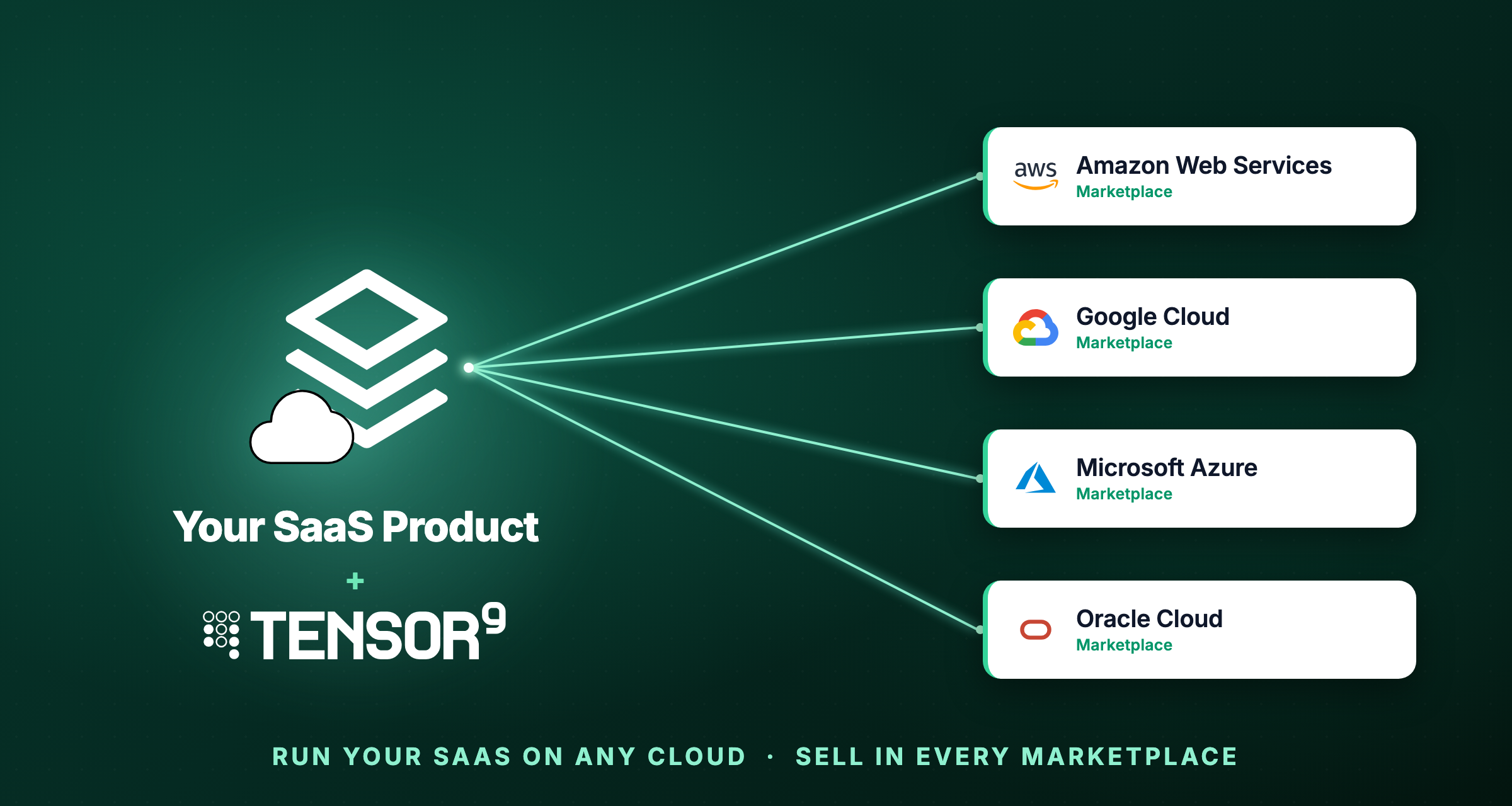
Then a deal shows up with a requirement your architecture cannot satisfy: buy it through our Azure Marketplace, run it in our Google Cloud project, or keep the data in OCI. Deals like these are often the fastest on the table, because buying through the customer’s own cloud draws down spend they have already committed, and each one needs the same thing, which is your product running on a cloud that is not AWS. What stands between you and that revenue is not the product, it is the cloud the product assumes.
We have spent the last two years building the machinery that closes that gap, taking a product built for one cloud and running it on another. The same engine handles both a second cloud of your own and a customer’s own environment. This post is about running first-party on every cloud: why the gap exists, why it is wider than most teams estimate, and what it actually takes to cross it.
The examples throughout use AWS as the origin, because it is the most common cloud vendors build on and the one Tensor9 translates from today. Nothing about the approach is specific to AWS as the starting point. The same service mapping runs with the origin cloud swapped out, and support for GCP and Azure origins is close behind, so if you built on one of those, what follows applies to you as well.
One thing this post does not solve is moving the data itself. Getting a live dataset from one cloud to another and keeping it consistent through the cutover is a separate and genuinely hard problem, and one we are only beginning to work on. Everything below is about the rest: the infrastructure and the managed services that let your product run on another cloud without a rewrite.
Your buyers’ budget is on another cloud
Multi-cloud is the ordinary shape of enterprise IT now, and Flexera’s 2026 State of the Cloud survey put 89% of organizations on more than one cloud. The cloud that matters for a given deal is the one where the buyer’s money is committed, and enterprises concentrate that commitment on a primary provider that is frequently not the AWS you built on.
That is where the budget goes. Software sold through the hyperscaler marketplaces grew from about $30 billion in 2024 and is forecast to reach $85 billion by 2028 and $163 billion by 2030 on Canalys’s estimate, growing much faster than direct sales, and Clazar’s 2025 marketplace survey found deals closing around 40% faster with 62% of that revenue landing as net-new.
The reason is a budget mechanism worth understanding. Large enterprises sign committed-spend agreements with their cloud provider (Microsoft’s MACC, AWS’s EDP), often a million dollars or more a year in exchange for discounts, and software bought through that provider’s marketplace draws down the commitment, provided the listing qualifies. So when your buyer on Azure or GCP compares two similar products, the one that transacts on their own cloud is spending money they have already committed, while the one that cannot, which is you if you only run on AWS, is asking their finance team for net-new budget.
The pull compounds past the budget line. Once you transact on a marketplace you become co-sellable, so the cloud’s own field sales can source and close deals on your behalf, and private offers let an enterprise run a negotiated purchase through the committed spend it has already promised its provider. That is much of why marketplace revenue tends to land as net-new and to close faster: you are selling alongside the provider rather than against its incentives, and running natively on the buyer’s cloud is what puts you inside that motion. Portability is a smaller bonus on top of it: a vendor who can stand the product up on another cloud on demand also has a straight answer when procurement asks about multi-cloud, where a cloud-agnostic slide does not.
Self-hosting turned out to be a cross-cloud problem
We did not initially set out to build a multi-cloud product. We set out to help software vendors deliver into their customers’ own environments, the self-hosted model where your product runs inside the buyer’s infrastructure instead of your account. Cross-cloud translation was always going to be part of that work. It sat lower on the roadmap than the deployment and lifecycle pieces, right up until it became clear that none of those mattered without it, because the buyer’s infrastructure is almost never the cloud you built on. A vendor builds on AWS, and the customer who wants it self-hosted runs on Azure, or GCP, or Oracle Cloud, or an on-prem Kubernetes cluster.
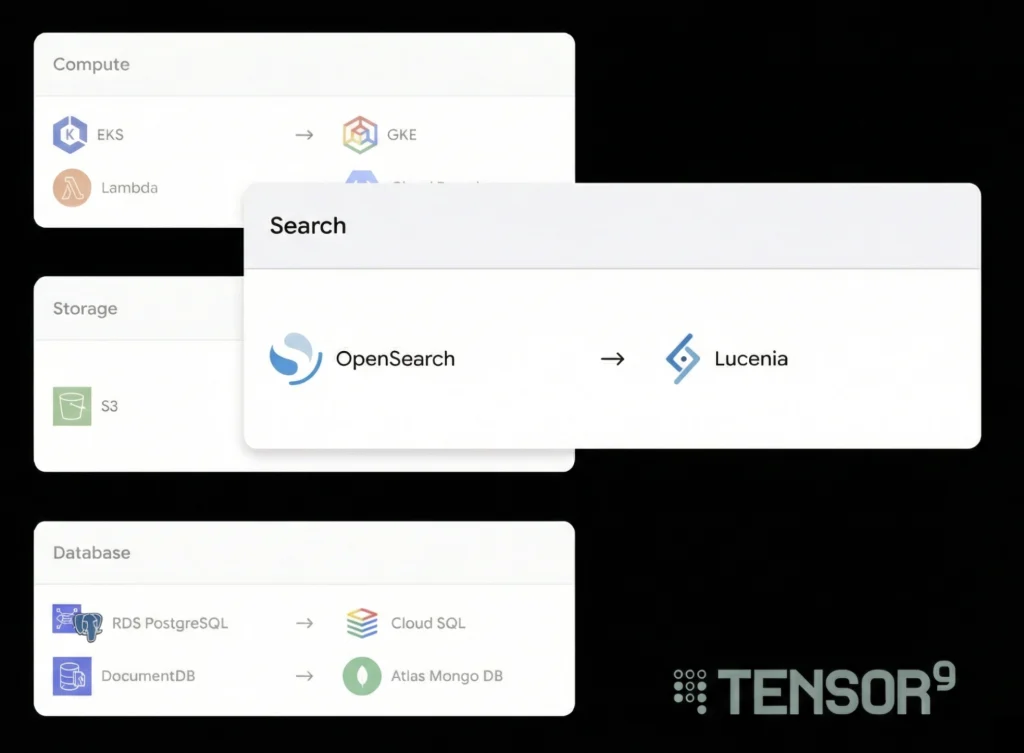
So to deliver self-hosting at all, we had to solve cross-cloud service translation first. There is no way to run a vendor’s AWS stack inside a customer’s Azure environment without answering what S3 becomes on Blob, what RDS becomes on Azure Database, what DynamoDB becomes on Cosmos, and the same question for every managed service the product depends on. We spent years on exactly that, service by service, because it was the price of admission to self-hosting.
The naive way to do it, the way almost everyone tries first, is to fork the stack and hand-build a variant for each target environment. That holds together for the first customer and falls apart by the third.
Running multi-cloud as a first-party SaaS is the same problem. “Also run it on GCP” sounds like one project, and in practice it is a second deployment path, a second test matrix, a second observability stack, and a second on-call surface, and it stays that way. Self-hosting into a customer’s cloud and running first-party on your own second cloud are the same underlying task, which is your AWS product running somewhere that is not AWS, and we had already built the thing that does it.
The way it works is to take the stack you already have, the AWS Terraform that already describes your product, and generate the deployment for every cloud you want to run on from that one description. You define the stack once, and each target comes out of the same source of truth rather than getting forked away from it.
Where the clouds actually diverge
Getting your compute onto another cloud is the easy portion of the work. EKS, GKE, AKS, and OKE are all Kubernetes, and your containers mostly do not care which one they land on. If your product were nothing but stateless containers, running it on a second cloud would be a lot easier.
More likely than not, your product leans on managed services, and managed services are where the clouds are least alike. Your aws_s3_bucket, aws_db_instance, aws_elasticache_replication_group, and aws_msk_cluster do not exist anywhere else. GCP, Azure, and OCI each offer something that plays a similar role, and that similarity is the whole difficulty, because similar is not the same.
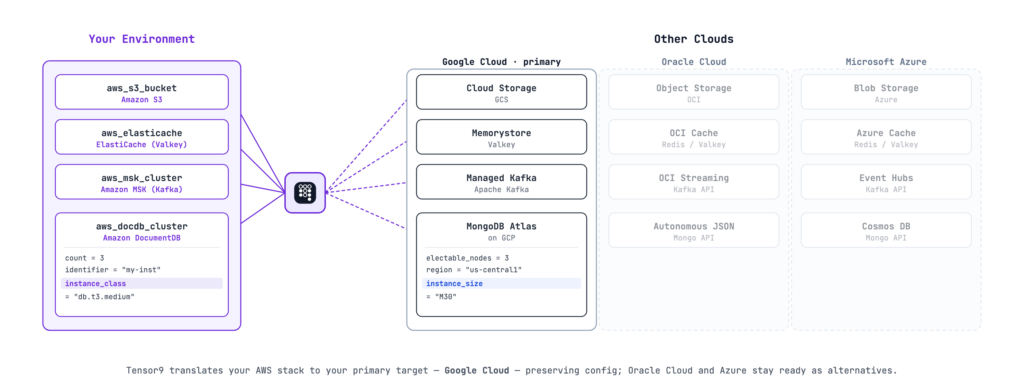
Take one line of your stack, an ElastiCache cluster running Valkey. Every cloud has a managed equivalent: Memorystore on GCP, Azure Cache for Redis, OCI Cache. They are the same idea expressed in genuinely different terms. AWS sizes memory by node type, so you write cache.t3.medium. A Kubernetes Valkey operator sizes it by a resource limit, so you write 3Gi. Same property, different representation. It runs deeper than units, too. ElastiCache gives you a single multi_az_enabled flag; Kubernetes has no equivalent switch and reaches the same high availability declaratively, spreading replicas across zones with pod anti-affinity and topology spread constraints. Azure’s managed Postgres accepts only major versions where RDS happily took 15.4. Every one of those differences is a small decision that has to be made correctly, and there are hundreds of them.
Two ways to run an AWS service somewhere else
For any AWS service your product depends on, there are two paths to running it on another cloud, and which one applies is a property of the service, not a decision you make once for the whole stack.
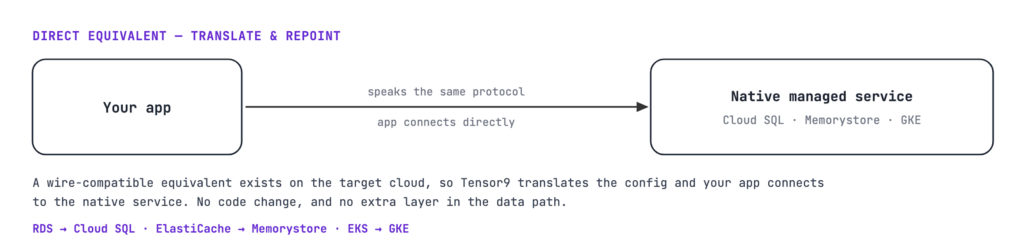
The first path is a direct equivalent. Some services have a true managed counterpart on the target that speaks the same protocol. Postgres is Postgres whether it runs on RDS, Cloud SQL, or Azure Database for PostgreSQL. Redis and Valkey are the same wire protocol on ElastiCache, Memorystore, Azure Cache for Redis, and OCI Cache. Kubernetes is Kubernetes across EKS, GKE, AKS, and OKE. For these we translate the infrastructure configuration to the target’s managed service and your application connects to it directly, because the connection string now points at a database or cache that answers the same way. Your product ends up on the target cloud’s native managed service, which is what you want when you own the account and want the operational support that comes with managed.
The translation is still real work, because the configuration surfaces do not line up. That is where db.t3.medium becomes the right Azure SKU, where storage units and version precision change, and where a capability that exists on one side has to be matched or gracefully dropped on the other. We keep those mappings in our service catalog: for each service and each target, the specific configuration translations, the capability gaps, and what happens when a capability is missing. The generated deployment keeps as much of your source behavior as the target supports and tells you plainly where it cannot, rather than pretending the two are identical when they are not.
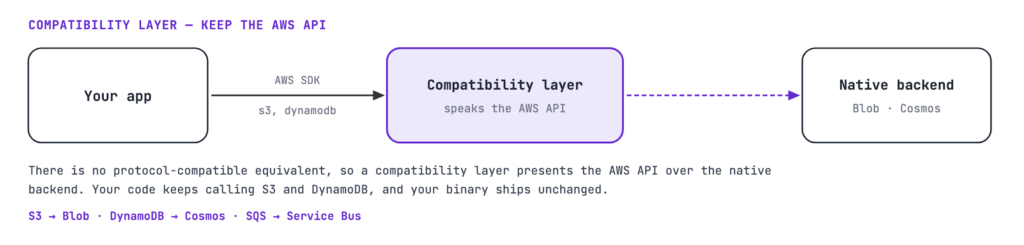
The second path is a compatibility layer, for the services that have no protocol-compatible equivalent anywhere else. Azure Blob Storage is not S3, Cosmos DB is not DynamoDB, and Google Pub/Sub is not SQS. The obvious fix is to rewrite the parts of your app that call those services, once per cloud, which is exactly the multi-quarter rewrite you are trying to avoid. Instead we run a small service alongside your application that speaks the AWS API and translates each call to the native backend underneath. Your code keeps calling s3.getObject and dynamodb.PutItem against the AWS SDK, and those calls land on Blob or Cosmos without the application knowing anything changed. You trade a small hop in the data path for keeping your binary exactly as it is.
The reason to understand the line between the two is that it tells you, service by service, what a given dependency actually costs to move. Where a wire-compatible equivalent exists, we translate and repoint, and you run natively with no extra layer. Where it does not, the compatibility layer keeps your code untouched at the cost of that layer sitting in the path. Neither one asks you to rewrite the application, which is the entire point, but they have different operational profiles, and the first useful exercise on your own stack is to sort each service into one bucket or the other.
We will explore the technical approaches for each of these models in depth in a follow-on blog post.
Migrating an estate versus delivering a product
A related problem gets most of the attention: migrating or cloning an existing cloud estate from one provider to another. Tools built for that read your live infrastructure, reverse-engineer it into a portable definition, and move or replicate it, which is genuinely useful when an infrastructure team wants to relocate what it already runs.
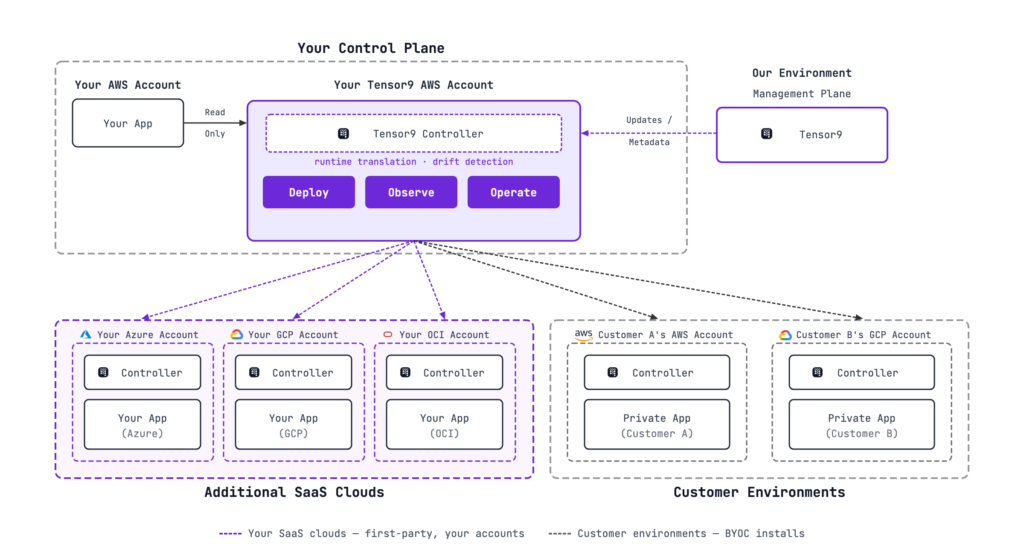
A software vendor needs something a step beyond that, because you are not relocating an estate once, you are delivering a product that has to run on several clouds at the same time and keep running as you ship new releases. That is why translating the stack is only half of the work. Where a service has no equivalent, the compatibility layer keeps your application’s AWS API calls working at runtime rather than asking you to rewrite them, and a controller stays resident in each target to hold every cloud on your current release. A migration remaps the infrastructure and ends there; product delivery is continuous, which is what the resident controller is for.
Why this is hard to build in-house
Any single one of these translations is a tractable problem, and that is exactly the trap. Each one looks doable on a whiteboard, so a team starts, and then meets what they actually signed up for.
It is not a project so much as a standing obligation. The service catalog is only worth anything if it stays complete and current, which means every managed service you touch, multiplied by every cloud you target, held against the fact that AWS, GCP, Azure, and OCI all ship changes underneath you continuously. You are not building a mapping once, you are agreeing to maintain one against four moving targets for as long as you offer the clouds.
The semantics are unbounded even though the demo is not. Getting S3 to GCS working for the happy path is a week or two. The long tail is what costs quarters: lifecycle policies, IAM edge cases, the availability models that do not line up, the version-precision mismatches, and the failure behavior that only appears under load in a customer’s environment at the worst possible time.
Translating the stack is also only half the job. A translated deployment you cannot operate is a liability, so now you need drift detection to keep every cloud on the same release, and you need one observability story rather than three separate per-cloud consoles, with logs, metrics, and traces from every environment gathered into the backend your team already watches. That is a control plane, not a script.
Every engineer-quarter spent on cross-cloud service translation and a multi-cloud control plane is a quarter not spent on the thing your customers actually pay for. The teams that tried to build this in-house did not fail for lack of talent. They stalled because “which deployment are you running?” became the first question on every support call, and the roadmap quietly sank under the weight of infrastructure that was never the point of the company. We decided to do this work once, carefully, so that each vendor does not have to do it repeatedly and partially on their own.
What the workflow looks like
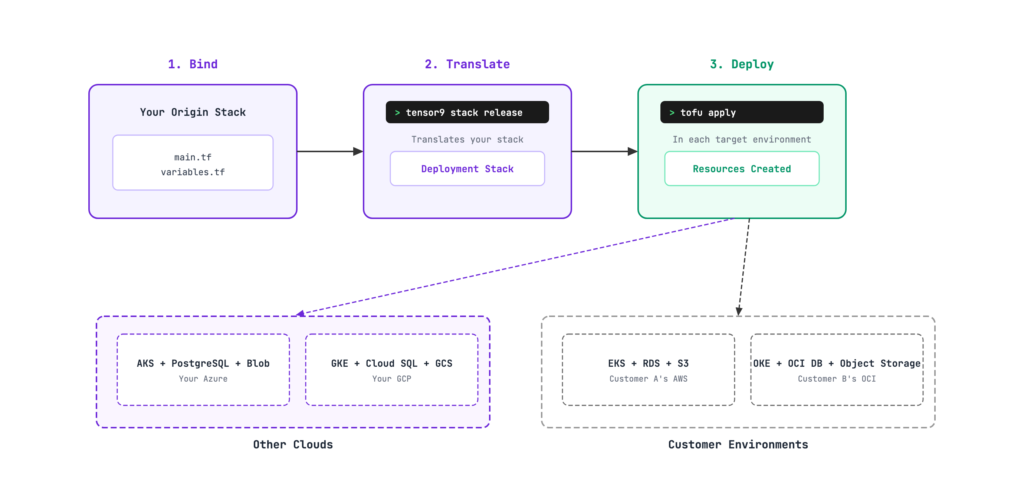
In practice it is three steps. You bind the origin stack you already have, the Terraform that describes your AWS product, without modifying it. Tensor9 translates that into a deployment stack for each target cloud, mapping the managed services and inserting the compatibility layer where there is no clean equivalent. Then you deploy it with an ordinary tofu or terraform apply, into your own cloud accounts if you are running first-party across clouds, or into a customer’s environment if you are delivering self-hosted. In every target a controller stays resident to handle what a one-time translation cannot: runtime API translation, drift detection against your release, and telemetry back to your single observability backend. It is deliberately the same pipeline for both cases, because they are the same underlying problem, which is your application running on a cloud other than the one it was built on.
What to plan for
Automating the infrastructure translation removes the largest and most repetitive part of going multi-cloud, but it does not remove all of it, and it would be dishonest to suggest otherwise. The most obvious gap is the data itself: translating the stack stands up the target infrastructure, but a cloud migration also means getting your live data onto the new cloud, moving or replicating it and keeping it consistent through the cutover, and that is a hard problem the stack translation does not touch. It is a part of the picture we are only beginning to work on, so for now it stays something you plan and run yourself.
Coverage is uneven across targets, so GCP and Azure are further along for us than OCI today, and there are services where the honest answer is still “pass it through” or “remove it” rather than “translate it.” Marketplace listing and metering, the part that turns running on a cloud into transacting on it, we handle through partners rather than build ourselves.
If you are weighing this for your own stack, the first question to ask is which of your services are wire-compatible and which are not, because that line is what separates a simple repoint from a runtime translation, and it shapes the whole effort.
The fastest way to answer that for your own stack is a short assessment with us. You do not need to hand over your codebase; walk us through the managed services your product depends on and we will map each one across GCP, Azure, and OCI, service by service: where it repoints to a native equivalent, where the compatibility layer carries the AWS API, and where we would tell you the truth about a gap. You come away with a clear picture of what multi-cloud would actually take for your stack, and it is yours whether or not you go further with us.