Your SaaS Product, Their Infrastructure: How Tensor9 Makes On-Prem Delivery Simple
AI and strict regulations are driving demand for on-premise software. In this post, we dive into how Tensor9 allows you to deploy your existing SaaS product to customer-controlled physical infrastructure without rebuilding your stack.


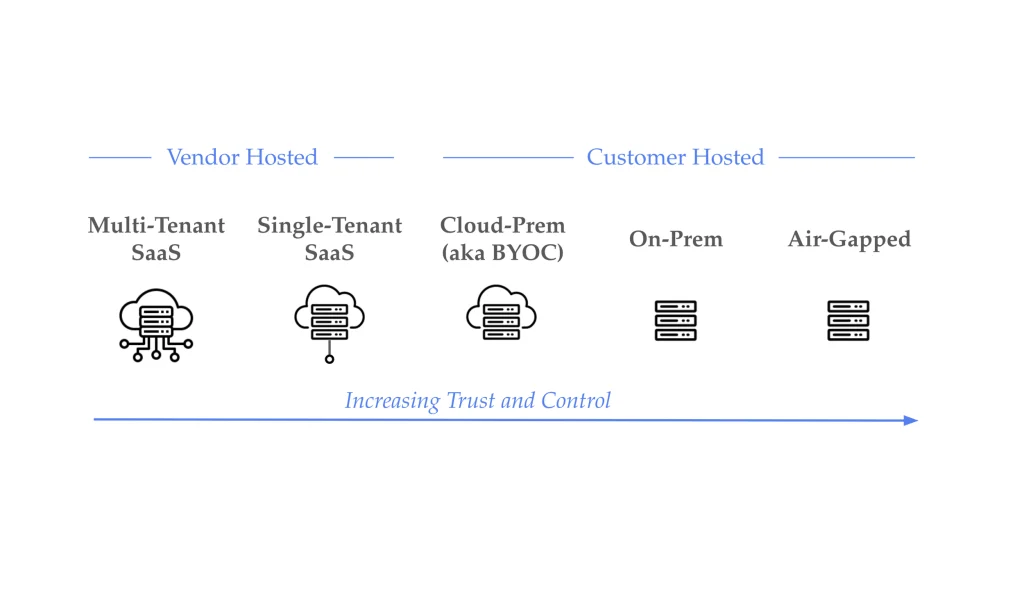
While SaaS transformed how software is built and delivered, a growing number of enterprise customers want to run vendor software in infrastructure they control. For some, that means their own cloud account, i.e. their AWS VPC. For others, it means something more: physical servers in their own data center.
Tensor9 enables SaaS vendors to deliver their products to any customer-controlled environment, including cloud VPCs and on-prem data centers, without rebuilding their architecture or spinning up a dedicated deployment team. In this post, we’re focusing specifically on on-prem: deploying to a customer’s physical infrastructure.
Notes:
- For deeper architecture guidance on BYOC broadly, see our BYOC Design Playbook.
- This post covers connected on-prem. Airgapped is a separate deployment model we’re developing with design partners.
The AI Era Is Accelerating On-Prem Demand
For years, “customer-controlled infrastructure” often meant deploying into a customer’s cloud account, i.e. their AWS VPC. That model works for many enterprises. But the rise of AI is pushing a growing segment of customers further: they don’t just want your software in their cloud account, they want it running on hardware they physically control.
This shift is driven by several factors unique to on-prem:
Regulatory requirements that mandate physical control. Certain industries such as defense contractors, intelligence agencies, and critical infrastructure operators face compliance frameworks that require data to remain on physically secured, auditable hardware.
AI model behavior concerns. When AI processes sensitive data, organizations want to eliminate any possibility of that data being used to train external models or being accessible to cloud provider employees. On-prem deployment provides the strongest possible guarantee.
Long-term cost predictability. For high-volume AI workloads, the economics of owned hardware can be significantly better than cloud compute, especially for inference at scale.
SaaS vendors building AI-powered products are feeling this pressure acutely. The same capabilities that make your product valuable (deep data analysis, intelligent document processing, learning from customer information) are exactly what triggers the most stringent deployment requirements.
Why This Matters for Enterprise Sales
Government agencies, financial institutions, healthcare organizations, and large enterprises in regulated industries often have non-negotiable on-prem requirements. Without an on-prem deployment option, these customers aren’t prospects; they’re disqualified before evaluation begins.
Building on-prem support yourself means maintaining separate infrastructure code for each target environment, setting up unique deployment pipelines per customer, managing artifact distribution and credentials across environments, and coordinating with customer teams for every deployment and operation. Most SaaS companies that attempt this end up with two divergent products: their SaaS offering and an under-maintained on-prem version that lags behind.
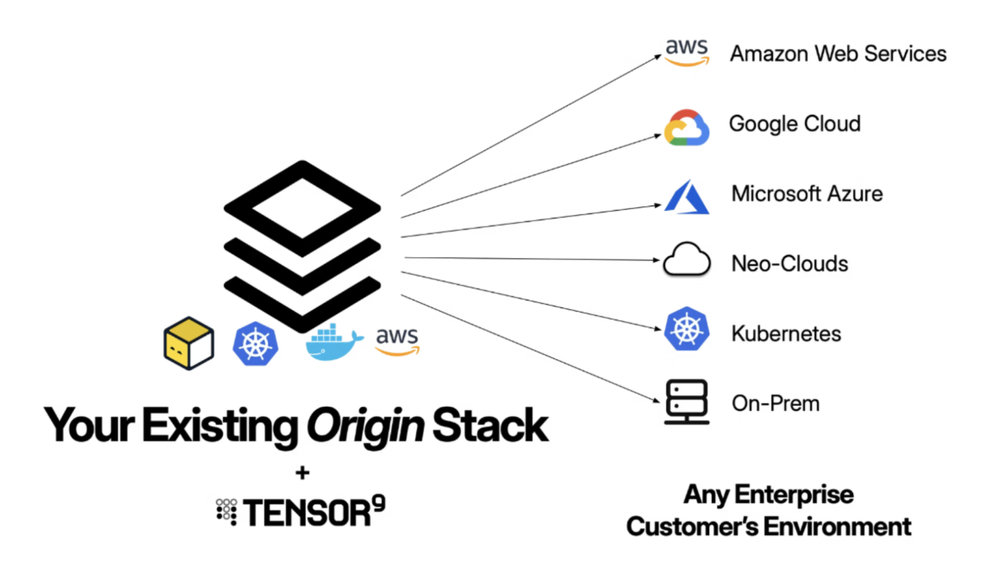
Tensor9 lets you maintain one origin stack that compiles to any target environment, eliminating the operational overhead that makes on-prem prohibitive for most vendors.
How Tensor9 Works: Private Appliances
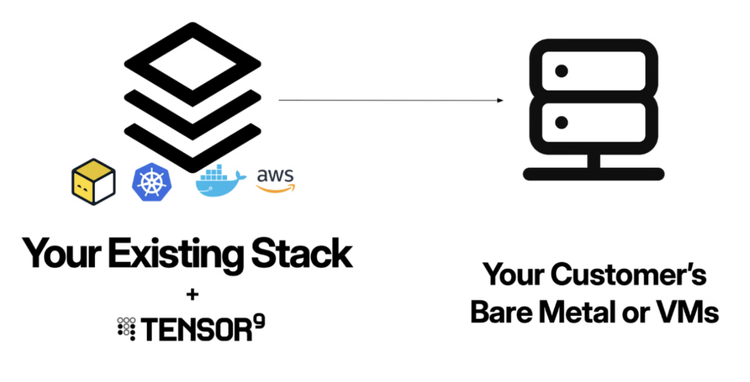
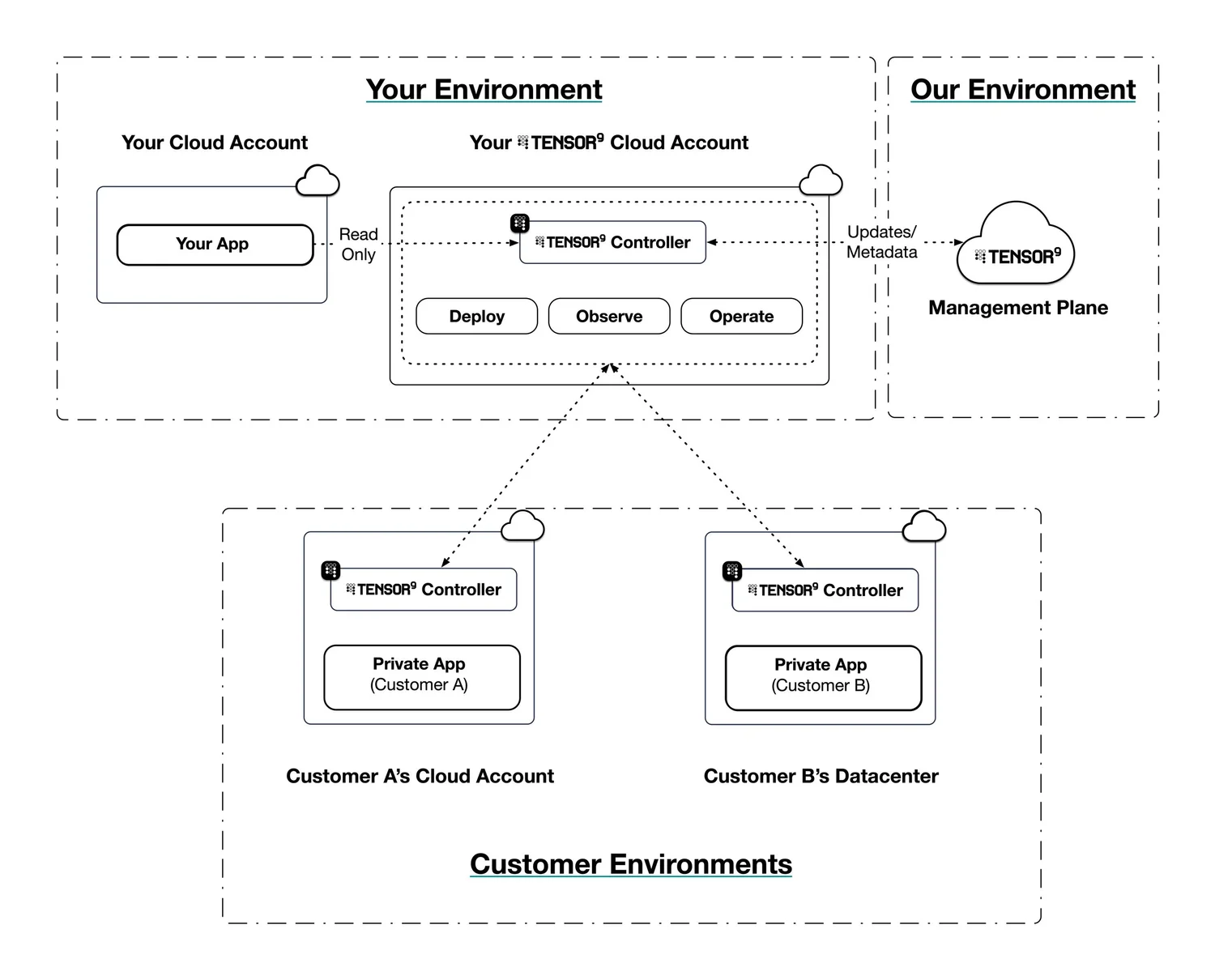
Tensor9 delivers your existing application to customers as a private appliance installed directly into their environment. A Tensor9 control plane in your cloud account creates a controller that orchestrates deployments and allows you to operate and observe your customers’ appliances.
Here’s the technical flow:
1. Connect Your Stack
Connect your app’s origin stack to Tensor9. Tensor9 supports origin stacks defined in Terraform/OpenTofu, CloudFormation, Kubernetes Manifests/Helm, and Docker Compose/Containers. You don’t need to rearchitect anything; Tensor9 works with what you’ve already built.
2. Create an Appliance
Create a customer signup link and provide it to your customer. They will spin up an appliance with an intuitive UI. An appliance is defined by its form factor, which specifies the target environment (AWS, GCP, Azure, DigitalOcean, or on-prem) as well as which managed cloud services are required.
3. Compile Your Stack
Use the tensor9 CLI to compile your origin stack into a deployment stack for your customer’s new appliance. The deployment stack is generated Terraform/Helm/K8s manifests targeting your customer’s specific environment. This is where Tensor9’s power becomes clear: the compilation process automatically maps cloud services to their equivalents in the target environment.
For example, if your appliance is running on Kubernetes in a customer’s data center, compilation will automatically replace an AWS load balancer in your origin stack with a Kubernetes ingress, and replace AWS Aurora Postgres with an appropriate managed or self-hosted Postgres instance. You maintain a single origin stack; Tensor9 handles the translation.
4. Deploy to the Appliance
Use your standard tooling (such as Atlantis, Spacelift, or Terraform Cloud) to deploy your compiled deployment stack to a customer appliance. If your origin stack is defined using Terraform/OpenTofu, you simply run terraform apply or tofu apply on the deployment stack. Tensor9 applies changes to the corresponding appliance through a secure channel.
5. Observe and Operate
Observe the state, performance, and usage of deployed resources in customer appliances. Metrics, logs, and traces are synchronized back to your observability sink of choice.
You can also operate deployed resources within customer appliances. Execute kubectl commands or request temporary, scoped access to cloud resources. Customers must approve any commands or temporary access you request, giving them full control over their environment.
Key Technical Capabilities
Service Equivalents
One of the biggest challenges with on-prem deployment is losing access to managed services you depend on, e.g. RDS, S3, managed Kafka. With Tensor9, you maintain a single origin stack and let the compilation process map cloud services to their equivalents in the target environment. RDS becomes a managed Postgres instance; S3 becomes local object storage. No need to maintain separate infrastructure code for each deployment target. You can see the current service equivalents library in our documentation.
Artifact Management
Tensor9 identifies artifacts in your origin stack including container images, S3 objects, and other dependencies, and automatically copies them to appliance-local storage during deployment. You don’t need to build your own artifact replication and distribution systems or manage credentials for artifact access across customer environments.
Secrets Management
Secrets are a cornerstone of security, but distributing them securely across vendor and customer environments is often a manual, risk-prone process. Tensor9 automates this using a powerful, declarative approach built into your Infrastructure as Code (IaC). We support both customer-supplied secrets (e.g., API keys) and vendor-supplied secrets (shared secrets). No more coordinating with customers for secret injection and rotation across multiple systems.
DNS and Endpoints
Tensor9 provisions DNS records for each appliance under a domain the customer specifies (vendor-owned or customer-owned) with delegation to customer infrastructure where appropriate. No more coordinating with customer network teams to configure DNS for each deployment.
Customer-Controlled Operations
Enterprise customers don’t just want your software in their environment. They want control over how it operates. Tensor9 enables customers to approve operations commands before execution, with full audit logging. You can request temporary, scoped access to resources, but customers always have final say.
Data Sovereignty by Design
When your application runs as a Tensor9 appliance, customer data never leaves their environment. The data stays where it is. Your application comes to it.
On-Prem Technical Details
On-premises deployments use Kubernetes as the underlying orchestration platform. Your customer installs and manages their own Kubernetes cluster on their infrastructure, and Tensor9 deploys your application into that cluster. This approach gives customers full control over their hardware, data center location, network topology, Kubernetes distribution, and operational practices.
Before deploying to on-prem environments, customers need some basic prerequisites, including a Kubernetes cluster, network connectivity, access to a container registry, and persistent storage. Customers can choose from various Kubernetes distributions based on their environment, including vanilla Kubernetes, K3s, OpenShift, and more.
Best Practices for On-Prem Deployments
Test with your customer’s Kubernetes distribution. Different distributions have subtle differences in behavior. If possible, create a test appliance using the same distribution your customer will run in production.
Document hardware requirements clearly. Provide minimum and recommended specifications for CPU, memory, storage, and network bandwidth. Customers managing their own infrastructure need this to provision correctly.
Plan for limited connectivity. Some on-prem environments have restricted internet access. Account for scheduled connectivity windows and on-premises artifact mirrors.
Provide operational runbooks. Customers managing their own infrastructure benefit from detailed documentation: troubleshooting guides, performance tuning guidelines, backup and restore procedures, and scaling recommendations.
Operational Simplicity: What Stays the Same
On-prem deployment shouldn’t require you to change your architecture, tools, or processes. Here’s what doesn’t change when you adopt Tensor9:
- Your tech stack: Keep your existing architecture, databases, and services
- Your CI/CD pipeline: Continue using the deployment tooling your team already knows
- Your development workflow: Ship features the same way you always have
- Your operational model: Monitor and debug through familiar interfaces
What changes is your market reach. Deals that were previously impossible or required painful custom work become standard deployments.
The Path Forward
The SaaS model isn’t going away, but it’s becoming one deployment option among several, rather than the only option. The vendors who thrive will be those who can meet customers where they are, offering the modern software experience enterprises expect with the deployment flexibility they require.
Tensor9 makes that flexibility achievable without the traditional trade-offs. You stay focused on building great software. Your customers get to run it however works best for their organization. And deals that used to be impossible become straightforward.
If you’re a SaaS vendor watching enterprise opportunities slip away because of deployment requirements, or if you’re seeing “on-prem” appear more frequently in RFP requirements, we should talk.
Looking ahead: fully airgapped deployments. For customers with completely disconnected environments (with no outbound internet access at all) we’re building support for airgapped appliances with offline artifact distribution and asynchronous update mechanisms. We are actively working with several design partners and would love to hear about your needs as we bring this solution to life.
Ready to bring your SaaS product to on-prem customers?
Contact Tensor9 to learn how we can help you reach new markets without rebuilding your stack.
We offer a focused 45 minute assessment to help teams:
- Map your current model
- Uncover risks and operational bottlenecks
- Identify a streamlined path to delivering in enterprise customer environments without custom installs or operational sprawl