How Lucenia Is Building Consistent Self-Hosted Deployments with Tensor9

A tutorial-style walkthrough for SaaS vendors exploring self-hosted deployment options
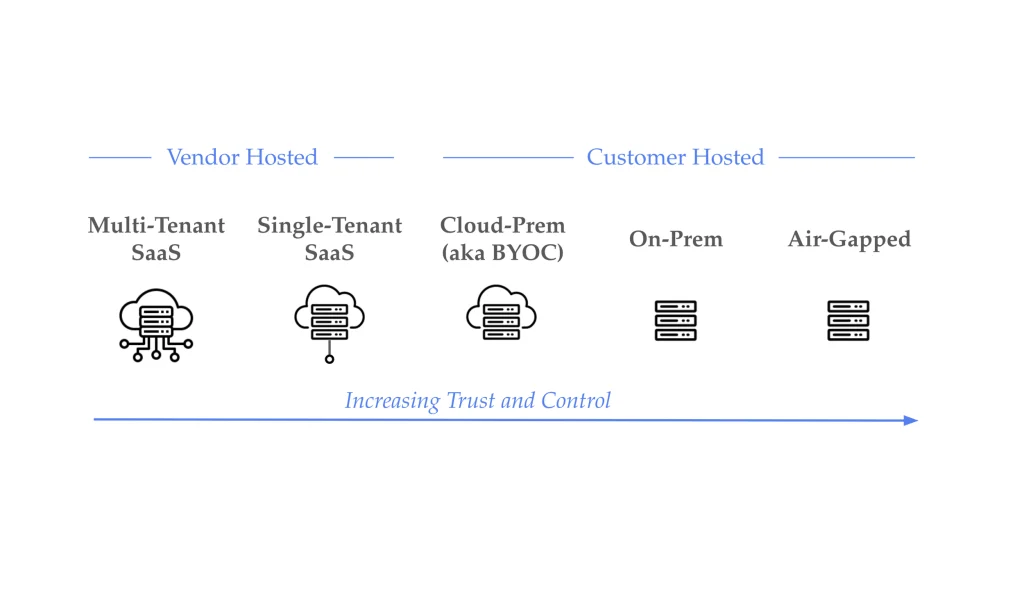
When your enterprise customers want to run your software in their environment, whether that’s AWS, GCP, Azure, or their on-prem data center, you face a fundamental question: how do you maintain deployment consistency without drowning in parallel infrastructure code?
Lucenia, the enterprise search platform founded by Nick Knize, PhD (creator of AWS OpenSearch), is working through this exact challenge. Their target customers include organizations managing petabyte-scale data across diverse environments, from cloud-native startups to federal agencies with strict data sovereignty requirements.
What makes this partnership interesting is that it works both ways: Lucenia is leveraging Tensor9 to simplify their self-hosted deployment story, while Tensor9 is adding Lucenia as a service equivalent, bringing a portable, open-source search primitive to the registry alongside Elasticsearch and OpenSearch. Check out our previous post on Lucenia as a service equivalent here.
This post walks through how Lucenia is approaching self-hosted deployments with Tensor9, and what the patterns look like for other infrastructure software vendors considering the same path.
The Problem: Deployment Fragmentation
Lucenia’s customer base spans a wide spectrum of deployment preferences:
- Cloud-native enterprises on AWS want to leverage managed Kubernetes (EKS) and integrate with their existing Terraform workflows.
- GCP-primary organizations need search that runs alongside their existing Google Cloud infrastructure.
- Bring-your-own-Kubernetes customers have mature platform teams and want Lucenia deployed into their existing clusters via Helm.
- Federal and regulated customers require air-gapped deployments with no external dependencies, some managing 30+ petabytes of data in disconnected environments.
- Cost-conscious teams want to move away from expensive managed search services.
To serve these customers, Lucenia maintained five deployment mechanisms:
- Shell scripts for quick-start installations
- Terraform modules for AWS infrastructure
- Ansible playbooks for traditional VM deployments
- Helm charts for Kubernetes clusters
- Kubernetes operator with custom CRDs
Each mechanism worked. The problem was maintaining five of them. Lucenia wanted to offer self-hosted deployments without the engineering overhead of maintaining parallel systems.
Lucenia’s Current Stack and Requirements
Lucenia’s deployment story is container-native. Their search platform runs as containerized workloads; they’re not expecting to use cloud-managed services for the core search functionality. This makes them well-suited for a Kubernetes-based deployment model that can work across different environments.
Their origin stack uses:
- Helm charts for Kubernetes deployments
- Terraform as the infrastructure-as-code layer
- Cert-manager for TLS certificate automation (with Let’s Encrypt by default, but supporting bring-your-own CA)
- NLB (Network Load Balancer) for ingress
The Tensor9 Approach: Single Origin Stack, Delivered Anywhere
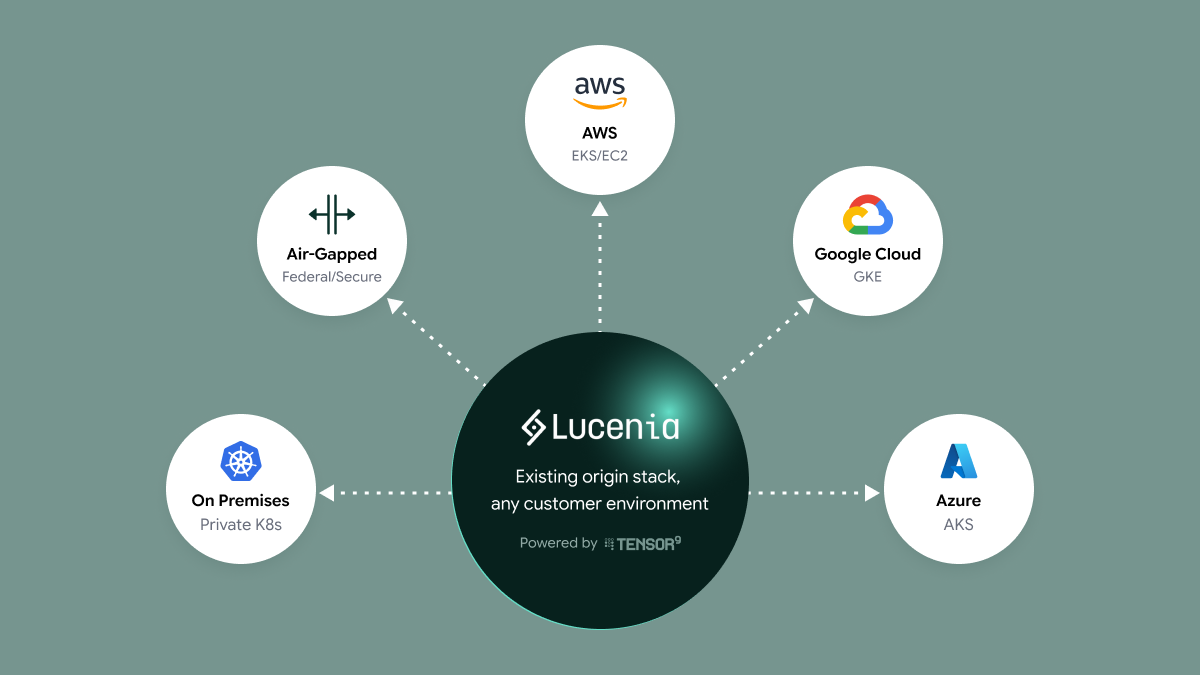
The core idea behind Tensor9 is straightforward: instead of maintaining separate deployment systems, you define a single “origin stack” that describes what you want deployed. Tensor9 then compiles that stack to target-specific configurations for each customer environment.
For Lucenia, this means defining their search cluster requirements once (including node configuration, storage, monitoring, and networking) and letting the compilation step handle the translation to AWS EKS, GCP GKE, or private Kubernetes.
The mechanism that makes this possible is something Tensor9 calls “service equivalents.” Cloud providers offer similar services under different names and APIs. AWS RDS, Google Cloud SQL, and Azure Database for PostgreSQL are all effectively managed PostgreSQL. They share the same wire protocol but use different packaging.
Tensor9 maintains a registry that maps these services to their functional equivalents across environments. When compiling a deployment stack, abstract resources get translated to their cloud-specific implementations.
Tutorial: The Target Deployment Workflow
The following workflow represents the approach Lucenia is implementing with Tensor9. The patterns are based on Tensor9’s existing deployment capabilities (validated with other customers) adapted to Lucenia’s requirements. We’ll walk through the five steps that take an origin stack to customer deployment.
Step 1: Define the Origin Stack
The origin stack is a single source of truth for infrastructure. Lucenia’s actual origin stack is structured as a multi-stage deployment:
lucenia-eks-node-group-and-helm-origin/

├── 0_cluster_infra/    # VPC, EKS cluster, node groups

├── 1_crd_install/      # CRDs: cert-manager, external-secrets

├── 2_k8s_apply/        # Lucenia Helm + supporting resources

└── README.md
This separation matters: CRDs must exist before resources that depend on them, and cluster infrastructure must exist before Kubernetes resources can be deployed. Each stage is a separate Terraform root module.
Tensor9 leverages Lucenia’s existing stack without them having to make modifications. The translation to specific clouds happens at compile time.
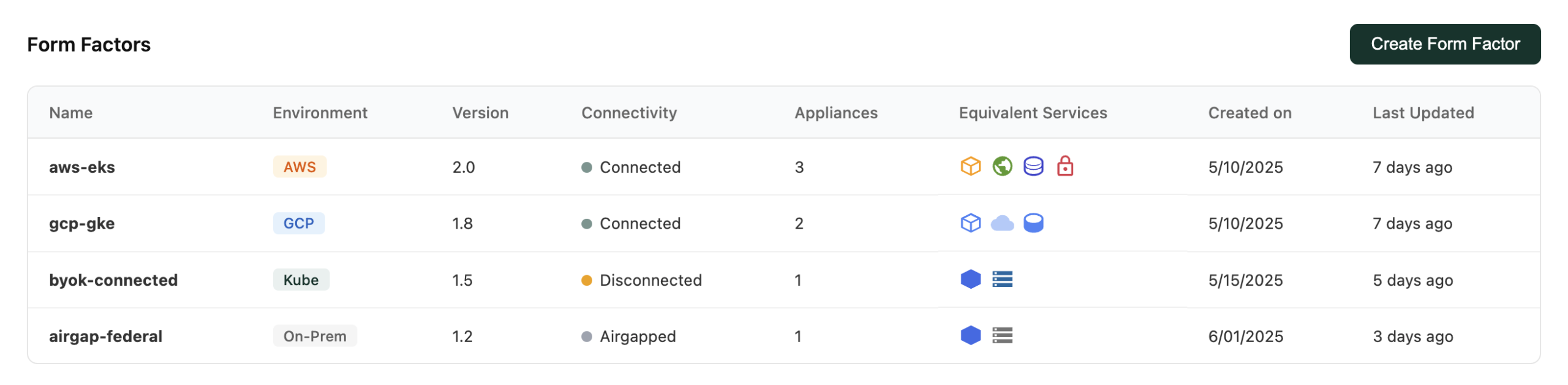
Step 2: Create Form Factors
Form factors define the target environments where customers can deploy. Lucenia supports several:
Option A: Bring Your Own Kubernetes (BYOKs)
- For customers who already have K8s expertise and want to use their existing clusters.
- Customer experience: Lucenia gets installed into their existing cluster. The customer manages the K8s infrastructure; Lucenia manages the search application.
Option B: Managed K8s in Customer’s Cloud
- For customers who don’t have K8s expertise (or don’t want to manage it).
- Customer experience: They provide cloud credentials, and the compiled stack provisions a managed K8s cluster (EKS, GKE) along with the Lucenia deployment. The customer doesn’t need to manage K8s directly.
Step 3: Customer Appliance Setup
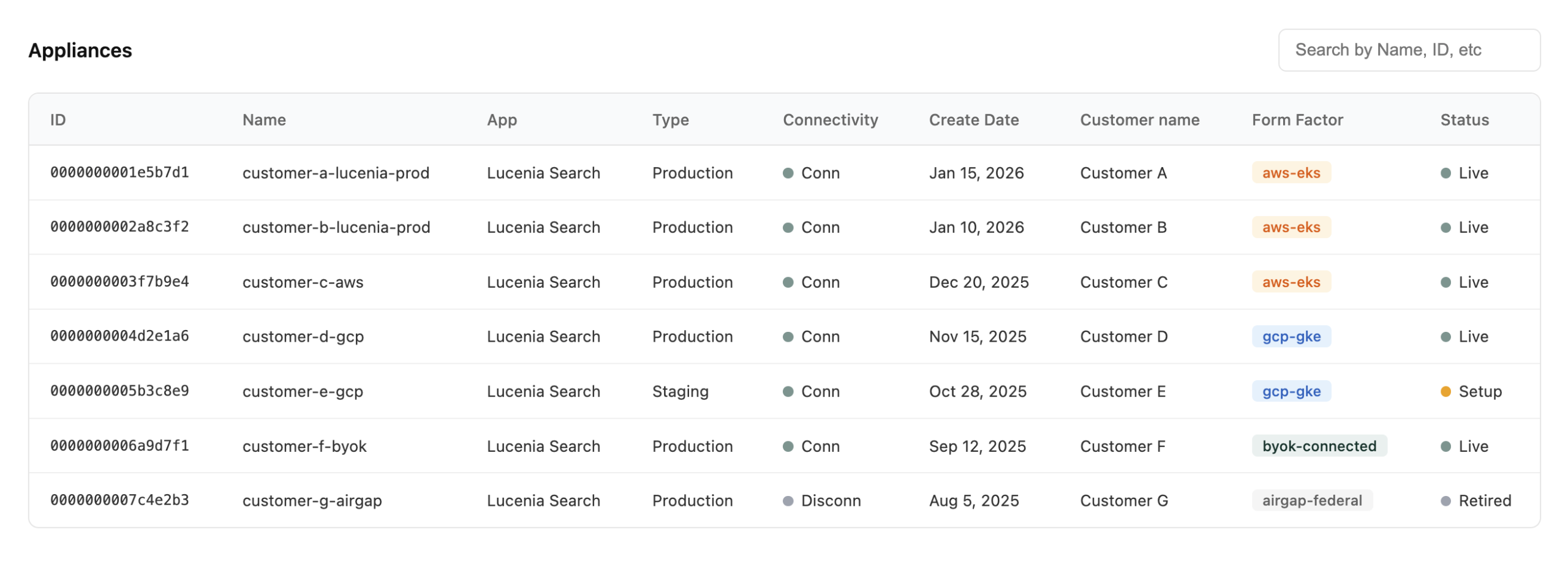
From the customer’s perspective, the experience is consistent regardless of their environment. Lucenia creates a customer signup link and provides it to their customer. The customer will then spin up an appliance with an intuitive UI. Customers can choose their installation method, including Helm or Terraform. An appliance is defined by its form factor, which specifies the target environment (AWS, GCP, Azure, DigitalOcean, or on-prem) as well as which managed cloud services are required.
Step 4: Compile to Deployment Stacks
When Lucenia compiles an origin stack for a specific form factor and customer appliance, Tensor9 will match the form factor (Lucenia’s app requirements) with what the customer can provide (an AWS account, GCP account, or their own Kubernetes cluster) and pick the appropriate resource for the target environment. The output is complete Terraform configuration ready to apply in the target environment, handling the bulk of cloud-specific translation automatically.
For a BYOKs customer, a few snippets from the compiled stack might look like:
resource "tensor9_lofi_twin" "svc_equiv_twin" {

    owner          = "Vendor"

    origin_rsx_type = "aws_eks_cluster"             # origin: AWS EKS

    projected_rsx_type = "tensor9_svc_equiv"

    # maps: aws::1.0.0::eks::cluster → kubernetes::1.0.0::cluster

  }

  resource "tensor9_lofi_twin" "helm_release_twin" {

    owner           = "Vendor"

    origin_rsx_type = "helm_release"

    # deploys: lucenia chart v0.8.1

  }
Note: Everything in the compiled stack is a Tensor9 resource. When Lucenia deploys, it is deployed via Tensor9’s secure channel from Lucenia’s controller to the appliance. Lucenia does not have direct access to the customer’s account or environment.
Step 5: Deployment
Lucenia uses their standard tooling to deploy the compiled deployment stack to a customer appliance. They can simply run terraform apply or tofu apply on the deployment stack. Tensor9 applies changes to the corresponding appliance through a secure channel.
Step 6: Ongoing Operations
Once deployed, Tensor9 provides operational capabilities through a secure channel:
- Observability: Metrics, logs, and traces flow back to Lucenia’s observability stack. Lucenia can monitor cluster health, query performance, and resource utilization across all customer deployments.
- Updates: When Lucenia releases a new version, they create new releases that can be deployed with the same workflow.
- Support: When customers need help, diagnostics can be coordinated through the control plane with customer approval workflows.
Why This Matters for Software Vendors
If your enterprise customers increasingly want deployment flexibility, maintaining parallel deployment systems doesn’t scale. The Tensor9 approach offers a different path. When it works well, you get:
- Single source of truth: One origin stack defines your infrastructure. Changes propagate to all targets through compilation, not through maintaining parallel codebases.
- Compilation over configuration: Instead of asking customers to navigate cloud-specific configuration details, you compile deployment stacks that work out of the box for their environment.
- Customer data sovereignty: Customers deploy in their environment, with their credentials. You don’t need access to their cloud accounts for deployment.
- Consistent operations: Observability and support work the same way regardless of where customers deploy.
This is particularly relevant for vendors like Lucenia who are container-native and don’t rely on cloud-managed services for core functionality. When your application runs consistently in containers, the deployment challenge becomes: how do you get those containers running reliably in whatever environment your customer requires?
Learn More
- Lucenia’s post on adopting Tensor9: Self-Hosted Search Without the Self-Hosted Pain
- Solving Search in Multi-Cloud Deployments — The other side of this partnership: how Tensor9 adds Lucenia as a service equivalent for search
- Tensor9 Documentation — Technical overview and getting started guides
- Service Equivalents Registry — Full list of cross-cloud resource mappings
Ready to learn how you can bring your existing product to enterprise customer environments?
Contact Tensor9 to learn how we can help you reach new markets without rebuilding your stack.
We offer a focused 45 minute assessment to help teams:
- Map your current model
- Uncover risks and operational bottlenecks
- Identify a streamlined path to delivering in enterprise customer environments without custom installs or operational sprawl